Learn with Cliprise
Master cinematic AI creation with in-depth guides for prompting, composition, models, and creative workflows.
Your First 5 Minutes with Cliprise
From sign-up to first AI creation in under 2 minutes. Follow this simple 5-step guide to start generating professional AI content immediately.
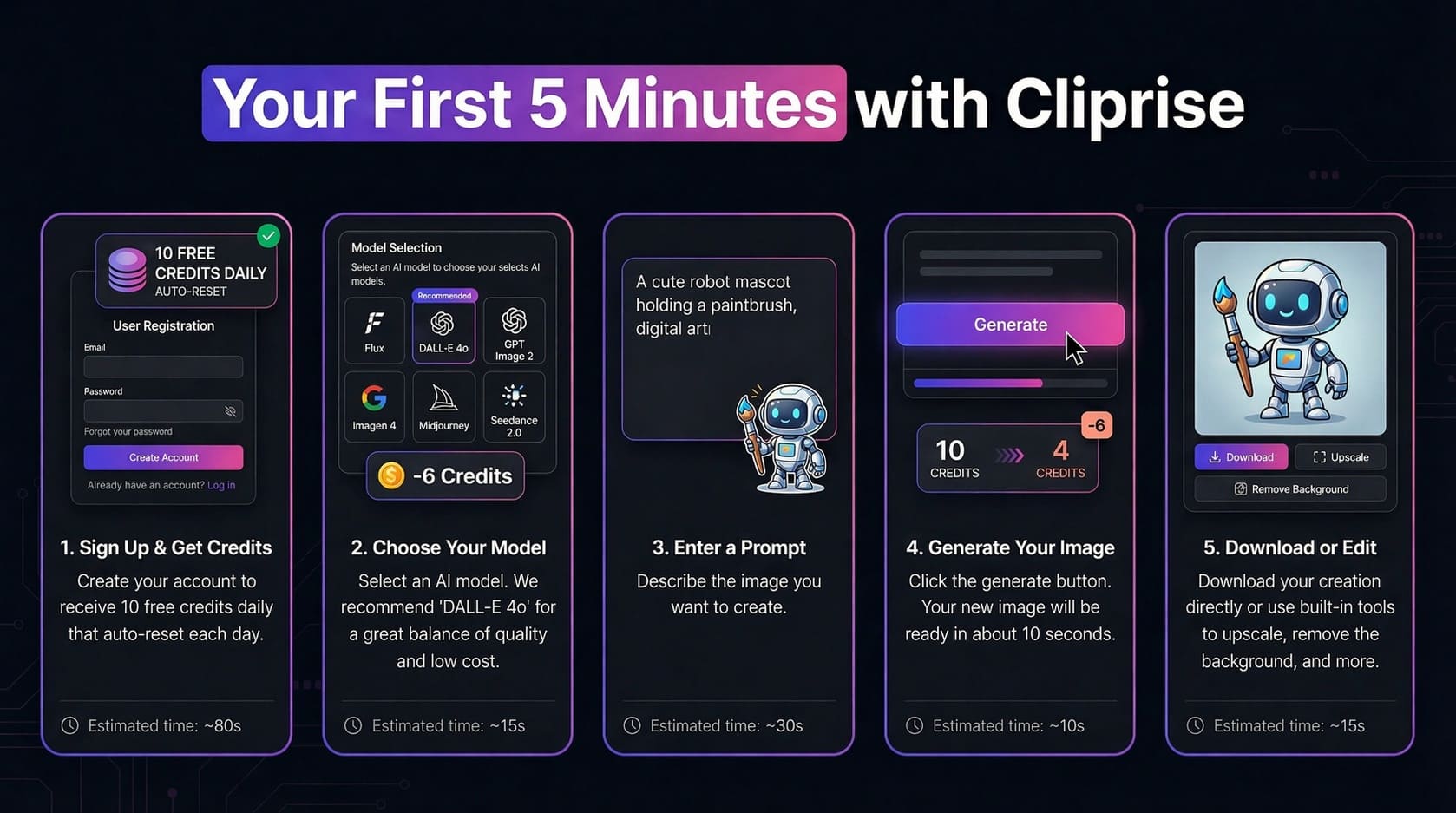
Sign Up
~80s
Create account — 30 signup credits once, then 10/day
Choose Model
~15s
Select AI model (DALL-E 4o recommended)
Enter Prompt
~30s
Describe what you want to create
Generate
~10s
Click generate and wait for magic
Download
~15s
Download or edit with built-in tools
Ready to Create Your First AI Image?
Sign up now and get 30 credits when you join (one-time), then 10 free credits per day to test fast models. No credit card required, start creating in minutes.
⏱️ Estimated time to first creation: Under 2 minutes
How Creators Use Cliprise: Real Workflows
See complete step-by-step workflows for common use cases. Each workflow includes process breakdown and estimated credit costs for budget planning.
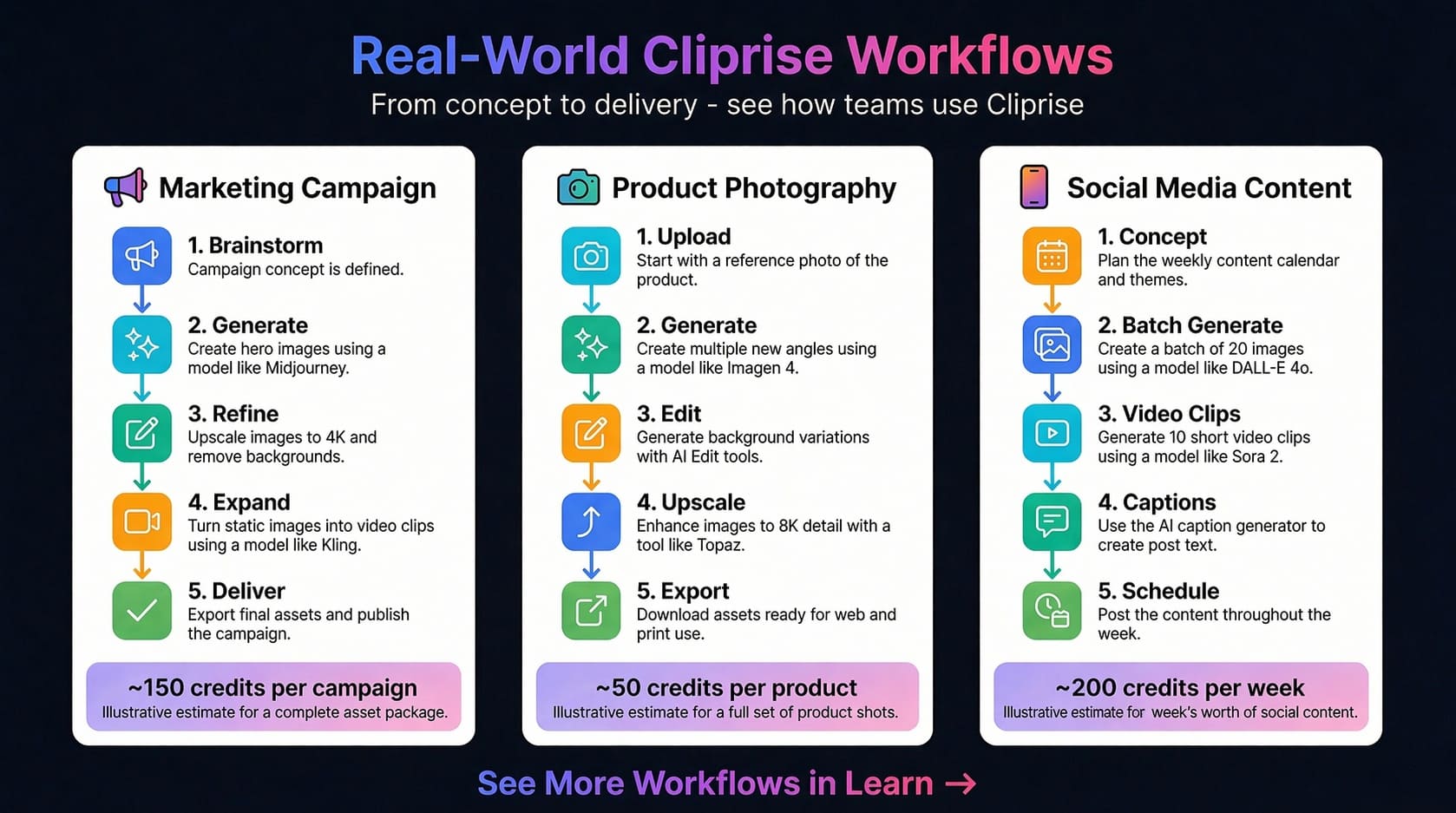
Marketing Campaign
≈150 credits per campaign
- 1.
Brainstorm
Define campaign concept & messaging
- 2.
Generate
Create hero images with Midjourney (15cr each)
- 3.
Refine
Upscale to 4K & remove backgrounds (19-37cr)
- 4.
Expand
Turn images into video clips with Kling (46-91cr)
- 5.
Deliver
Export final assets for web & print
Best Plan: Starter (900cr) = 6 campaigns/month
Pro Tip: Batch generate variations to find winners fast
Product Photography
≈50 credits per product
- 1.
Upload
Start with reference photo of product
- 2.
Generate
Create multiple angles using Imagen 4
- 3.
Edit
Generate background variations with AI tools
- 4.
Upscale
Enhance to 8K detail with Topaz (19-73cr)
- 5.
Export
Download assets for web & e-commerce
Best Plan: Pro (3,500cr) = 70 products/month
Pro Tip: Use Imagen 4 Standard for cost efficiency
Social Media Content
≈200 credits/week
- 1.
Concept
Plan content calendar & themes
- 2.
Batch Generate
Create 20 images with DALL-E 4o (120cr total)
- 3.
Video Clips
Generate 10 short clips with Sora 2 (11-15cr each)
- 4.
Captions
Use AI caption generator for post text
- 5.
Schedule
Post content throughout the week
Best Plan: Starter (900cr) = 4 weeks content
Pro Tip: Use fast models for high volume posting
Learn with Video
Watch comprehensive tutorials to master Cliprise AI in minutes
Cliprise Quick Tour - How to Generate AI Images & Videos in Seconds
A rapid 90-second tour of the Cliprise app, covering model selection, prompt-based generation, and the credit system.
How Cliprise Works Behind the Scenes - Clara's AI Art Story
A story-driven walkthrough following a creator named Clara to demonstrate how to select models and use the token system effectively.
Understanding the Credit System
Master how credits work in Cliprise. Learn about sources, renewal rules, generation costs, and how to maximize your monthly allocation.
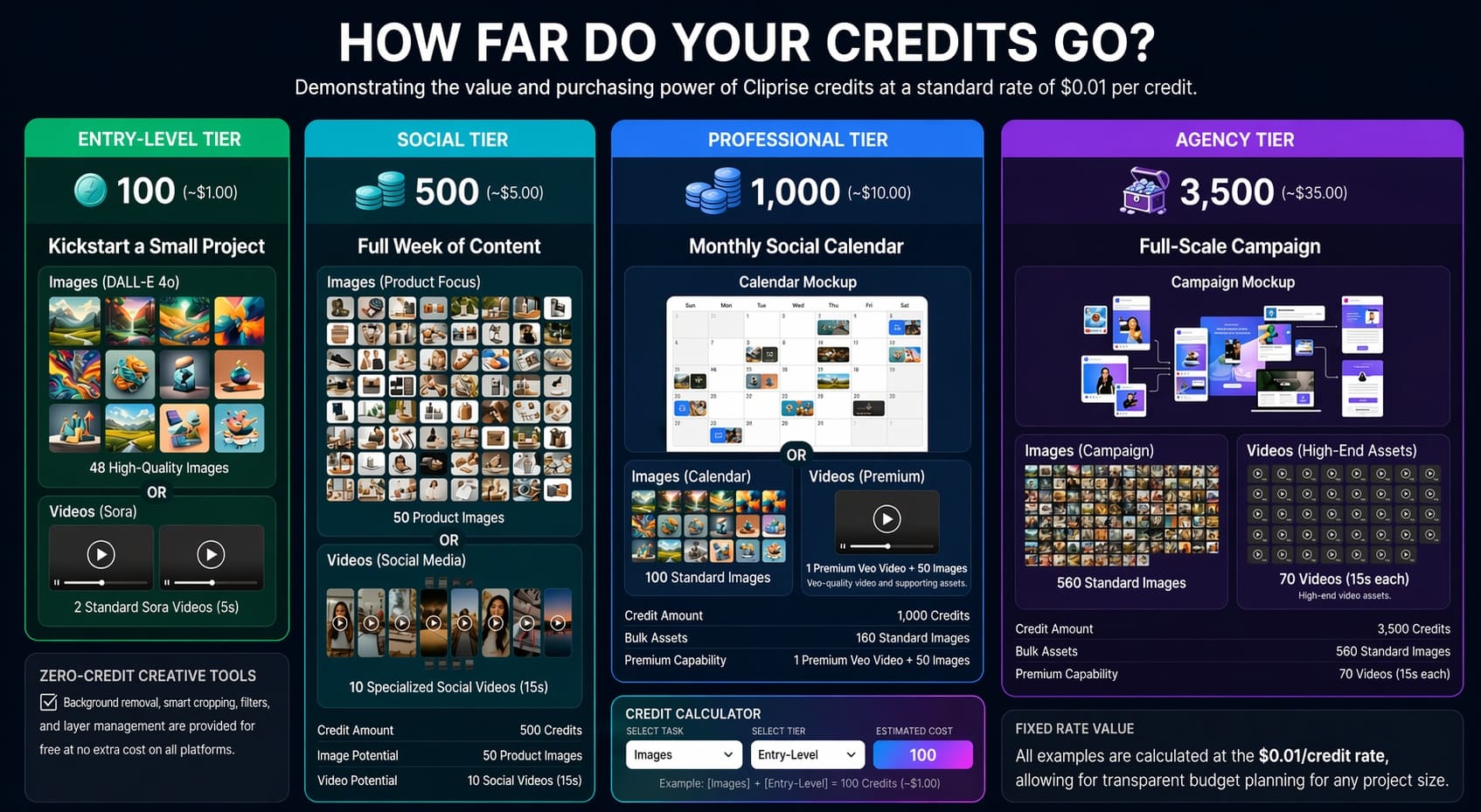
Credit Sources
- Subscription: Monthly credits from your plan
- Top-Ups: Purchase anytime; remain until used while your account is active
- Daily Free: 30 credits on signup (one-time), then 10/day on Free plan
Credit Availability
- Daily free: Reset every 24 hours on the Free plan
- Subscription: Refresh with each billing cycle
- Boosters: Remain available while your account is active
Check your in-app wallet for your current balance and applicable availability.
Key Rules
- Top-ups stay until used; monthly plan credits refresh (no rollover)
- Automatic refunds if generation fails
- Unified balance for all media types
Typical Generation Costs
Image Generation
- • Z Image: 2 credits
- • DALL-E 4o / GPT Image 1: 11 credits
- • Imagen V4: 8-22 credits (tiered)
- • Flux 2 / Kontext: 9-44 credits
- • Seedream / Nano Banana: tiered
Video Generation
- • Sora 2: 160-480 credits (4s / 8s / 12s at 40 credits/s)
- • Kling 2.5 Turbo: 76-152 credits
- • Veo 3.1 Lite: 60 credits / video
- • Veo 3.1 Fast: 120 credits / video
- • Veo 3.1 Quality: 500 credits / video
Audio & Voice
- • ElevenLabs TTS: 49 cr / 5K chars
- • Speech-to-Text: 7 cr / second of audio
- • Sound FX / Isolation: 1 cr / audio
- • V3 Dialogue: 1 cr / 5K chars
Pro Tip: Platform shows exact cost before you generate. Plan your monthly budget by estimating how many creations you need.
Credit costs can change when providers update rates. The in-app pricing screen always shows the exact credit cost before you generate. For reference tables, see Pricing or pricing.json.
Experiment Freely with AI
Don't fear mistakes - AI thrives on experimentation. Learn how to iterate, explore, and discover amazing results.
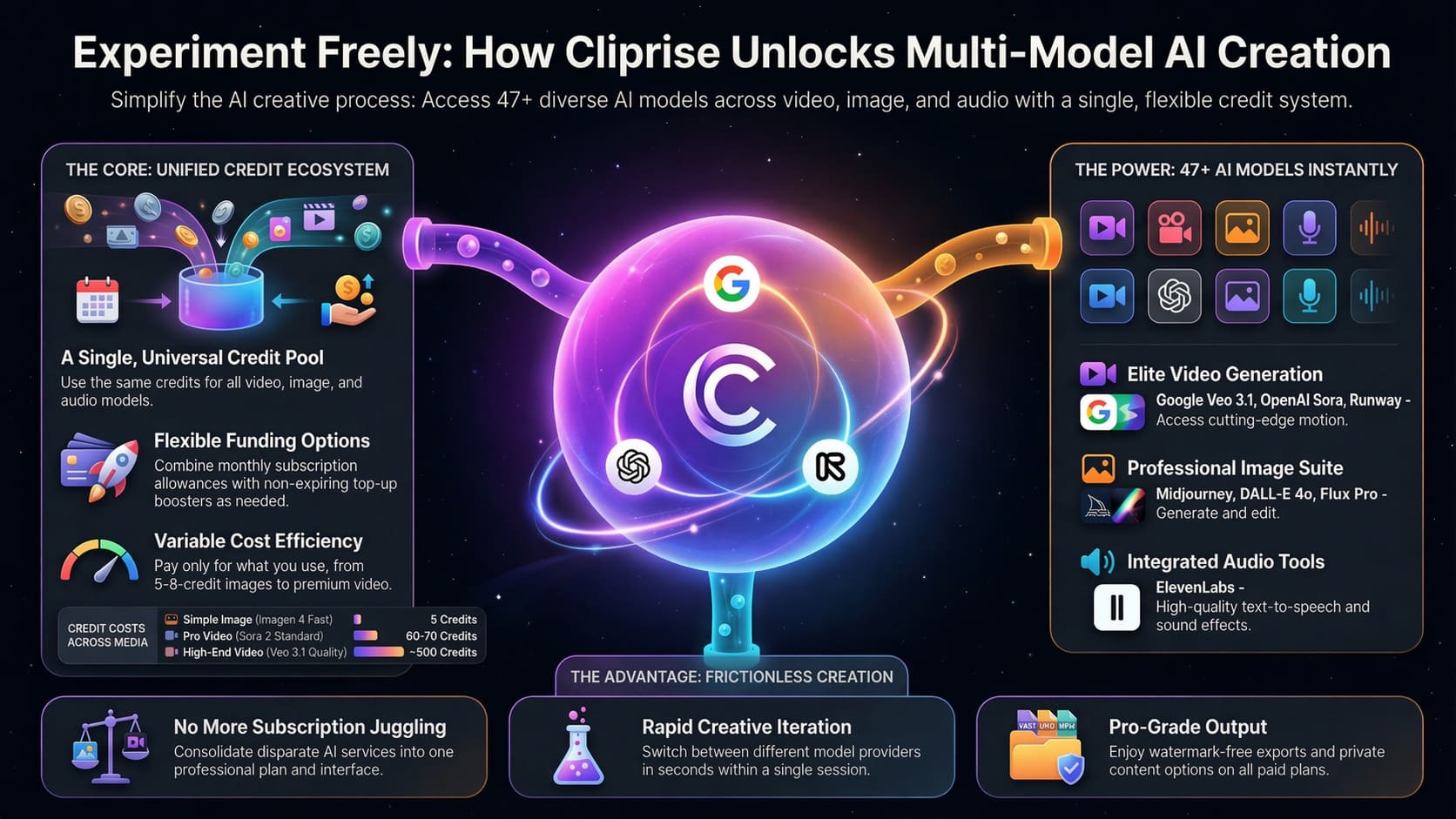
The Creative Explorer's Mindset
🎲 Try Different Models
Each AI model has unique strengths. Flux excels at realism, Midjourney at artistic styles, DALL·E at concepts. Experiment!
🔄 Iterate Quickly
Don't aim for perfection on the first try. Generate variations, tweak prompts, and refine. Your best work comes from iteration.
✨ Happy Accidents
Some of the best creative results come from unexpected AI outputs. Stay open to surprises and explore "mistakes."
📚 Learn as You Go
Every generation teaches you something. Save successful prompts, note what works, and build your creative toolkit.
💡 Pro Tips for Experimentation
- →Start broad, then narrow: Begin with simple prompts, then add details based on results
- →Use seed variations: Keep the same seed and only change one parameter to see its effect
- →Compare side-by-side: Generate multiple versions simultaneously to compare approaches
- →Mix and match: Combine styles, eras, and concepts in unexpected ways