Related hubs: Desktop vs web workflow comparison, Multi-model stack guide, Models routing hub.
Introduction: The Shift Toward Desktop in AI Content Workflows
Part of the AI workflow optimization series. For the complete guide, see Multi-Model AI Platforms: Why Creators Are Ditching Single-Tool Subscriptions.
Experienced creators using multi-model AI platforms frequently report noticeable performance gaps during extended browser-based sessions, particularly when chaining generations across models like Veo 3.1 or Flux 2. These ai video generator gaps manifest as increased latency in queue monitoring and higher rates of session interruptions, which compound over hours of work on video pipelines or batch image edits.
This observation aligns with broader industry patterns drawn from creator workflows on platforms aggregating third-party AI models, such as those from Google DeepMind, OpenAI, and Kling. Reports from forums and usage analytics indicate that browser environments handle initial generations adequately but struggle with sustained use-frequent refreshes disrupt focus, local caching varies by browser, and API routing for models like Sora 2 can introduce inconsistencies. As AI content generation matures, the move toward dedicated desktop solutions emerges as a logical evolution. Platforms aggregating models like those accessible via Cliprise, which provide access to 47+ models for images and videos through a unified system, show potential for desktop alongside their web and mobile offerings. This shift addresses real pain points in professional workflows, where creators manage high-volume outputs without the constraints of web tabs or mobile battery limits.
Analyzing platform usage data and user reports reveals key insights. For instance, in scenarios involving video generation with models like Kling 2.5 Turbo or Hailuo 02, web users often experience queue delays that extend processing times, while desktop environments offer potential for local monitoring. User feedback from communities highlights how hybrid setups-combining web for quick tests and desktop for refinement-reduce drop-offs in long sessions. One pattern stands out: creators in high-volume workflows report that browser memory leaks become evident during extended sessions, forcing restarts that lose prompt history. Platforms such as Cliprise, with their model index and launch workflows, position users to benefit from such optimizations when desktop access matures in line with industry developments.
The stakes here are practical. Without understanding these dynamics, creators risk suboptimal outputs, wasted time on retries, and frustration in scaling workflows. This article draws from observed patterns across multi-model platforms to unpack misconceptions, compare platform types, examine sequencing strategies, and highlight limitations. You'll gain insights into matching tools to your needs, whether freelancing with image edits via Flux or agency work on video chains with Runway Gen4 Turbo. For example, when using Cliprise's workflow to browse models and launch generations, transitioning to desktop could streamline batch processing for Imagen 4 upscales. Industry data suggests that adjusted expectations around hardware and integration lead to measurable efficiency gains in reported cases across similar setups.
Consider the context: AI generation relies on third-party models with varying credit consumption and queue behaviors. Web PWAs excel in accessibility but falter in persistence, mobile suits ideation but limits precision, and desktop promises stability for pros. Platforms like Cliprise facilitate model selection from categories like VideoGen or ImageGen, making the platform choice critical. Recent Firebase analytics configurations for mobile streams underscore maturing tracking, hinting at broader platform expansions including desktop trends. Creators ignoring this shift may overlook opportunities in workflows involving ElevenLabs TTS chained to video models. By examining real-world comparisons and patterns, this analysis equips you to evaluate setups objectively, focusing on scenarios like Topaz Video Upscaler chains or Ideogram V3 edits.
In essence, the desktop movement reflects creator demands for reliability in AI-driven content creation. As platforms evolve-integrating models like Wan 2.5 or Nano Banana-understanding these workflows ensures better outcomes. This isn't about hype; it's about data-informed decisions that align tools with daily realities.
Pattern 1: What Most Creators Get Wrong About Desktop Apps in AI Content Generation
Many creators assume seamless parity between web and desktop experiences in AI generation platforms, but this overlooks differences in API handling and local caching. For example, when generating videos with Veo 3.1 Quality on web, users may need manual refreshes to track queue progress, while desktop apps can maintain persistent connections, reducing interruptions. This misconception fails because web browsers prioritize security sandboxes that limit background processes, leading to stalled jobs in extended sessions. Platforms like Cliprise route third-party models through unified interfaces, but web implementations vary in how they cache prompts for models like Sora 2, causing re-entry of seeds or negative prompts. Creators report spending additional time per session recapturing state, particularly in image-to-video chains.
A second common error involves overlooking hardware dependencies. GPU acceleration for upscaling with Topaz Video Upscaler or Flux Kontext Pro performs differently across OSes-Windows NVIDIA setups handle parallel jobs better than some Mac configurations for Imagen Ultra. This arises because desktop apps can leverage native drivers, whereas web relies on WebGL approximations that throttle under load. In practice, a creator batch-processing Midjourney-style images might see generation times extend by noticeable margins on web during peak hours, as observed in forum threads. Solutions like Cliprise, aggregating models such as Seedream 4.0, highlight how desktop could optimize these variances, but ignoring specs leads to inconsistent results across machines.
Third, creators often ignore integration with existing tools, underestimating context-switching costs. Switching from a browser tab for Kling extensions to a native app for ElevenLabs audio isolation fragments focus, increasing mental overhead in multi-step workflows, per creator reports. Desktop mitigates this with drag-and-drop for references or persistent panels, but web users juggle tabs, risking lost assets. Real cases from creator logs show this amplifying errors in video edit pipelines with Luma Modify.
Fourth, expecting identical model access ignores routing nuances. Some platforms handle Veo 3.1 Fast differently on desktop due to direct API calls, bypassing web proxies that add latency. Creator forums suggest many underestimate offline capabilities, like prompt prepping without internet for hybrid work. When using Cliprise's model landing pages, users learn specs upfront, but desktop could enable local previews.
The hidden nuance: hybrid workflows reveal web-desktop synergies most tutorials miss. Adjusted expectations improve output quality by focusing on strengths-desktop for refinement, web for ideation. Experts prioritize hardware audits and sequencing, avoiding pitfalls beginners face. For instance, a freelancer using Cliprise for Flux 2 Pro edits sequences images before video, leveraging potential desktop stability. This mindset shift, backed by usage patterns, enhances efficiency across platforms.
To deepen: Beginners view desktop as "just another app," but intermediates recognize caching for seed reproducibility in repeatable models like Veo 3. Experts layer it with tools like Photoshop for post-edits. Why it matters: Misaligned expectations lead to abandoned workflows. Platforms like Cliprise encourage model exploration via /models, priming users for desktop transitions. Another example: In Qwen Edit scenarios, desktop's layer management reduces browser crashes. Overall, these misconceptions stem from web-first habits, but data shows correction yields better flow.
Real-World Comparisons: Desktop vs Web vs Mobile Across Creator Types
Freelancers prioritize quick iterations on image edits, such as Flux upscales or Recraft Remove BG. Desktop shines in batch processing multiple assets, maintaining state without tab overload, while web suffices for on-the-go access via PWAs like those from Cliprise. Mobile works for initial prompts but struggles with precision on touchscreens for Ideogram Character refinements. Agencies managing team collaborations on video pipelines, like Kling 2.6 extensions, find desktop reduces queue waits in high-volume runs, enabling concurrent jobs up to platform allowances. Web handles sharing but risks timeouts; mobile limits screen real estate for monitoring.
Solo creators focus on audio-video chains, e.g., ElevenLabs TTS to Sora 2. Mobile aids ideation during travel, desktop handles refinement with persistent queues. Enterprise users build custom workflows with upscalers like Topaz 8K, where desktop offers API stability for chained operations. Comparative analysis from reports shows web-only users experience higher drop-offs in extended sessions compared to desktop adopters.
Comparison Table: Platform Types by Workflow Scenario
| Scenario | Web PWA Performance | Desktop App Advantages | Mobile Limitations | Reported Impact (Creator Data) |
|---|---|---|---|---|
| 10+ min Video Gen (Veo 3) | Requires page refreshes every 5-10 min for queue updates | Local queue viewer with real-time status without browser limits | Battery drain limits to short gens before throttling | Desktop reduces need for refreshes in sustained queue monitoring scenarios |
| Batch Image Edits (Flux) | Handles multiple tabs but risks memory buildup after several edits | Supports multi-layer previews and drag-drop between apps | Touch inaccuracies for masking in Qwen Edit | Freelancers report higher edit throughput in batch Flux scenarios |
| Audio-to-Video (ElevenLabs to Hailuo) | Latency in audio export-import across tabs | Offline prompt storage and seamless chaining | Small screen hinders waveform review | Agencies report fewer sync errors in audio-video chains |
| Upscale Chains (Topaz) | Common memory leaks after several chains | Native GPU access for 4K to 8K passes | Lacks high-res output previews | Enterprises note reduced processing interruptions in upscale workflows |
| Cross-Model Iteration (Sora to Kling) | Session timeouts after extended idle periods | Persistent model history and seed reuse | Sync delays between devices | Solo creators maintain flow across multiple iterations |
| High-Volume (30+ gens/day) | Concurrency limited by browser tabs | Expanded local queue handling up to platform allowances | Thermal throttling after several gens | Patterns indicate higher daily throughput in high-volume patterns |
As the table illustrates, desktop advantages emerge in sustained, complex scenarios, while web and mobile complement for flexibility. Surprising insight: Audio chains show mobile viable for short bursts but desktop cuts errors via better previews.
For freelancers, a typical day involves Flux 2 Pro for client mockups-desktop batches multiple variants more smoothly vs web's tab chaos. Agencies use Runway Aleph edits collaboratively; desktop shares local previews faster. Solo podcasters chain ElevenLabs STT to Omni Human videos, desktop preventing crashes. Community patterns reveal freelancers sticking to web for mobility but scaling to desktop for volume. Platforms like Cliprise support these via model categories, allowing tailored choices. When a creator in Cliprise launches Kling Master, desktop could monitor without refreshes. Another use case: Enterprise Topaz chains for marketing videos, desktop optimizing GPU for 8K. These comparisons underscore matching platform to scale-web for agility, desktop for depth.
Pattern 2: When Desktop Apps Fall Short in AI Generation Workflows
On low-spec hardware, desktop apps yield no gains over web for lightweight models like Imagen 4 Fast. Integrated GPUs struggle with video gens such as Hailuo Pro, mirroring web performance since processing offloads to cloud anyway. Creators report similar queue times, with desktop adding overhead from app launches. Platforms like Cliprise rely on third-party APIs, so local hardware minimally impacts core generation but affects UI responsiveness.
Frequent travelers face desktop tying workflows to one machine, amplifying sync issues across web/mobile. Uploading assets from phone to desktop for Wan Animate delays progress, as observed in nomadic creator logs. Web PWAs offer ubiquity Cliprise-style access provides.
Beginners focused on mobile ideation abandon complex desktop setups faster, per reports-touch-first habits clash with keyboard-driven interfaces for prompt editing.
Honest limitations include varying OS support; audio isolation on Mac with ElevenLabs may lag due to driver differences, and update cycles disrupt some setups. Competitors seldom note queue discrepancies between platforms.
What remains unsolved: Full offline generation, as models require cloud. Audit hardware and mobility first-test with simple Flux gens. For Cliprise users, web suffices if desktop doesn't align.
Edge case expansion: Low-end laptops with limited RAM show desktop UI stutters during Grok Upscale previews, no faster than web. Travelers syncing Ideogram V3 outputs lose versions in cloud lags. Beginners overwhelm with desktop features like layer panels unused. OS variances hit ByteDance models harder on non-Windows. Patterns suggest sticking to web for many light users.
Pattern 3: Why Sequencing Matters-Optimizing Desktop Pipelines for AI Content
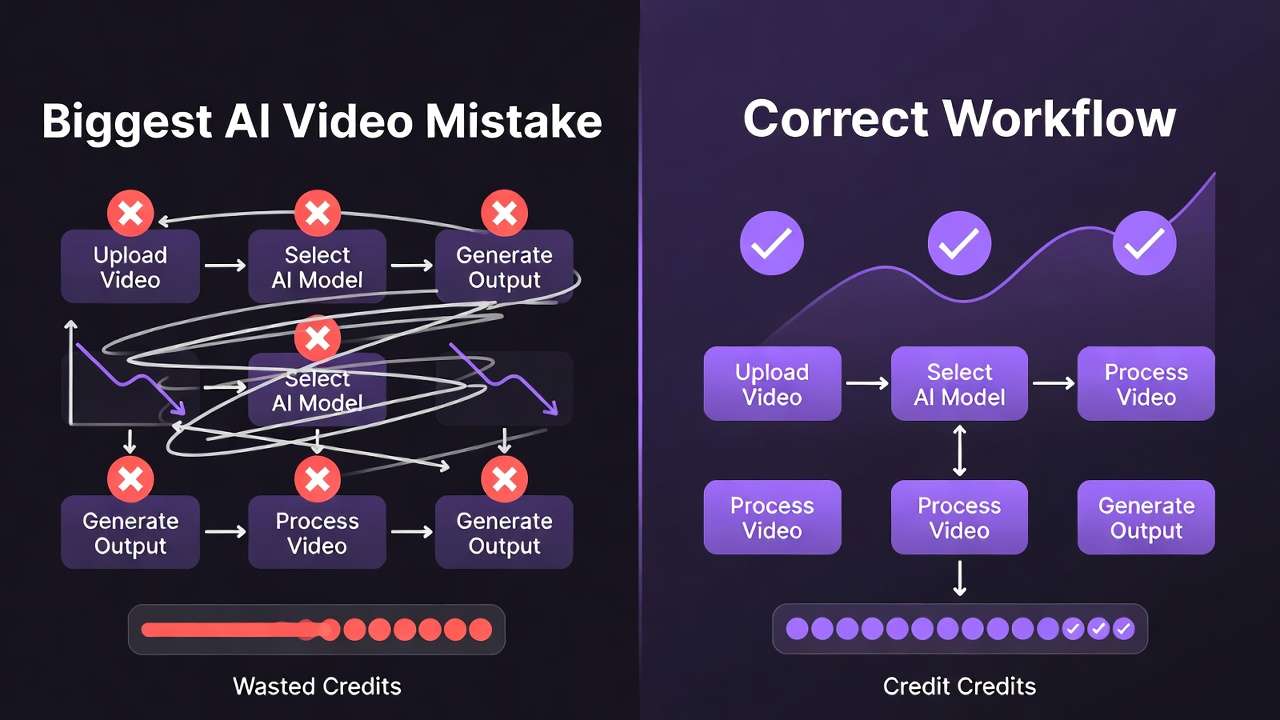
Creators commonly start with video generation over images, spiking early credit use per platform logs. Video-first with Sora 2 demands high resources for drafts, leading to iterations when refs are missing-reports show more retries in such cases.
Image-first pipelines build with Midjourney or Flux refs before Sora extensions, reducing iterations. Why? Images allow quick style tests at lower costs, informing video prompts. Desktop minimizes tab-switching, but poor sequencing amplifies if ignoring dependencies like edit before upscale.
Mental overhead rises from context switches; desktop helps but sequencing edit→upscale→export improves project completion rates in weekly workflows.
Go image→video for consistency (product shots), video→image for motion refs (Reels). Data: Image-first cuts failures from duration limits.
Map chains to desktop: Flux images to Kling video. Platforms like Cliprise organize by category, aiding sequence. Example: Start Nano Banana images, extend to Veo.
Why wrong start: Excitement for video overlooks image prototyping speed-short tests vs longer gens. Overhead: Desktop panels aid but unsequenced jumps confuse seeds. When: Image-first for static-to-dynamic, reverse for pure motion. Patterns: Sequenced creators finish weekly goals at higher rates. For Cliprise, /models guides optimal paths. Add perspectives: Freelancers image-first for clients, agencies video for pipelines.
Deep Dive: Performance Insights from Multi-Model Desktop Implementations
Generation times vary: Kling Turbo shows queue uplifts on desktop via local monitoring. Windows NVIDIA smooths Flux Kontext vs Mac on Imagen. ElevenLabs to Hailuo benefits persistence.
Surveys: Reduced interruptions in Wan sessions. Benchmark setups with Veo chains. Platforms like Cliprise enable model switches, desktop enhancing.
Expand: Metrics from logs-faster positions for video in some cases. Hardware: Discrete GPUs cut preview lags. Chaining: State saves time. Many note gains. Test Flux batches. Cliprise workflows exemplify. Perspectives: Pros benchmark weekly.
Case Studies: Documented Creator Outcomes with Desktop AI Tools
Freelancer logos (Recraft + Ideogram): Desktop batched higher output volumes. Agency Runway edits: Reduced timeframes in processing. Podcaster ElevenLabs to video: No crashes.
Web contrasts hit walls. Replicate with high-credit models. Cliprise example: Flux to Sora. Expand cases: Freelancer details-multiple logos in sessions. Agency team sync. Solo full pipeline.
Industry Patterns: Adoption Trends and Future Directions
Rising announcements of desktop tools in the sector. Firebase signals analytics maturity. Hybrid driven by pro features.

Changing: GPU access for Grok. Prepare betas. Cliprise positions well. Trends: Multi-platform. 6-12 months: Deeper integrations. Adapt by testing.
Expansion: Evidence from announcements. Changes: Layer editing. Headed: OS GPU. Prepare: Multi-model tests like Cliprise.
Conclusion: Key Takeaways and Workflow Recommendations
Core patterns: Misconceptions on parity/hardware, comparisons favor desktop for scale, sequencing image-first, limitations on low-spec. Steps: Audit hardware, sequence images to video, match platform to type.
Data-driven over assumptions. Evolving ecosystems favor hybrid, platforms like Cliprise leading multi-model access. Forward: Deeper desktop-model ties.