AI video generation in 2026 is useful when you match the workflow to the job: text-to-video for concept exploration, image-to-video for product and brand consistency, and model routing when motion quality matters more than novelty.
Quick answer: start with the first frame, not the final video. Build or choose a clean source image, decide whether the clip needs product accuracy or creative motion, then test one focused prompt across the right model family. Cliprise supports this workflow through the AI video generator, the image-to-video AI generator, and model pages such as Kling 3.0 and Seedance 2.0.
If the goal is a polished realistic or cinematic clip, use the realistic AI video workflow guide alongside this pillar.
What This Guide Covers
This guide covers the practical AI video generation system for 2026: how AI video models work, text-to-video versus image-to-video, prompt language for motion, resolution and frame-rate choices, model selection, credit planning, mobile workflows, and common mistakes that waste credits.
If you need a broader overview covering image generation, audio, and editing tools alongside video, see our AI Content Creation: The Complete Guide 2026. This guide goes deep on video specifically.
Animating stills instead of generating from scratch? Compare vendors in best image-to-video AI generators and read how free tiers actually behave in free image-to-video AI. When social feeds flood with leaderboard screenshots, temper hype with leaderboards vs real production workflows.
What Is AI Video Generation?
AI video generation creates motion content - social media clips, product demos, cinematic sequences, marketing videos, and animated stories - from text descriptions or static images, without cameras, actors, or filming equipment.
The technology works through video diffusion models. These models start with random noise and progressively refine it into coherent video frames, guided by your text prompt. Unlike image generation, which produces a single frame, video models must maintain temporal coherence - ensuring that objects, lighting, and movement remain physically consistent across dozens or hundreds of frames.
This is what makes video generation harder, more expensive, and more rewarding than image generation. A well-crafted AI video conveys motion, emotion, and narrative in ways that static images cannot.
In 2026, AI video quality has reached a threshold where generated clips regularly appear in professional advertising, social media campaigns, product marketing, and news production. Over 250,000 creators use an ai video maker like Cliprise to produce content daily, accessing an AI Video Generator with models from Google, OpenAI, Kuaishou, Alibaba, MiniMax, Runway, and ByteDance through a single unified interface. For a 2026 buyer's guide to how those engines compare, read our comparison of the best AI video generators.
If you're starting from scratch, generate a few high-quality candidate frames first inside the AI Image Generator, then animate your winner with the video model of your choice.
For stylized campaigns (anime, concept art, painterly visuals), many teams ideate first in the AI Art Generator before moving into motion.
HappyHorse 1.0 is another important addition to the 2026 AI video workflow because it combines text-to-video, image-to-video, reference-driven video, and editing-oriented use cases. Now that HappyHorse 1.0 is available on Cliprise, creators can test it alongside Seedance, Kling, Wan, and other video models instead of choosing a model based only on launch demos. It is especially relevant for product motion, app promos, e-commerce clips, and short-form marketing videos.
For a technical breakdown of how video architectures differ from image architectures, see our image vs video models technical comparison.
Text-to-Video vs Image-to-Video: Two Core Workflows
Every AI video starts with a choice: generate motion directly from a text prompt, or start with a static image and animate it. This decision shapes your output quality, cost, and creative control.
Text-to-Video
Any text to video generator works this way: you describe the scene in words, and the model handles both composition and motion from scratch.
Best for: Conceptual content, rapid exploration, situations where you don't have a reference image, and creative experimentation where unexpected compositions are welcome.
Trade-off: Less compositional control. The model decides framing, subject placement, and spatial relationships.
Image-to-Video
You provide a static image - either AI-generated or a real photograph - and the model adds natural motion to it.
Best for: Product demos, brand-consistent campaigns, architectural visualization, any project where the first frame needs to be perfect before motion is added. This approach gives you precise compositional control because you lock the starting frame.
Trade-off: Requires an additional step (generating or selecting the base image first), but almost always produces more predictable results.
Which Should You Use?
| Scenario | Recommended Workflow | Why |
|---|---|---|
| Quick social media content | Text-to-Video | Speed matters more than precision |
| Client deliverables | Image-to-Video | Control matters more than speed |
| Product demos | Image-to-Video | Product placement must be exact |
| Creative exploration | Text-to-Video | Unexpected results drive discovery |
| Campaign hero videos | Image-to-Video | First-frame perfection is critical |
| Rapid prototyping | Text-to-Video | Test concepts before committing |
The image-to-video approach is the foundation of most professional workflows. Validate your composition cheaply with an image model (often a few credits up to ~44 depending on model), then commit to expensive video generation only when the frame is right - always confirm the debit in the app. Skipping this validation step is the single biggest AI video mistake creators make.
For a deep strategic comparison, read Text-to-Video vs Image-to-Video: Choosing the Right Workflow. To compare text-to-video models by production workflow, see best text-to-video AI generators. For a complete walkthrough of the image-to-video pipeline, see our Image-to-Video Workflow Guide.
All 22+ AI Video Models Compared
Cliprise provides access to 22+ video generation models from 7 different providers. Each model has different strengths, pricing, and ideal use cases. Understanding these differences is the key to producing better output at lower cost.
Premium Tier: Cinematic Quality
These models produce the highest-quality video output available in 2026. Use them for hero content, client deliverables, and campaign-quality production.
| Model | Provider | Credits/Video | Duration | Resolution | Strength |
|---|---|---|---|---|---|
| Veo 3.1 Quality | 720 / video | Per video | Up to 4K | Cinematic realism, physics accuracy, environmental scenes | |
| Sora 2 | OpenAI | 160-480 / clip | 4s / 8s / 12s | 1080p | Strong narrative clips; see also Sora 2 Turbo for premium tiers |
| Sora 2 Turbo | OpenAI | 270-1,134 (tiered) | Varies | Up to 1080p | Higher-quality / longer Sora runs - confirm cost in app |
| Kling 3.0 | Kuaishou | See pricing | 3-15s | Native 4K | Native 4K at 60fps, multi-shot storyboards, integrated audio |
| Veo 3 | 150-300 | 5-8s | Up to 4K | Balanced premium with strong motion coherence |
Kling 3.0 is the first AI video model to generate natively at 4K (no upscaling), with multi-shot storyboards and integrated multilingual audio - ideal for product demos and cinematic B-roll. Veo 3.1 Quality delivers the most physically accurate motion in the industry - water flows realistically, fabrics drape naturally, and camera movements feel cinematic. Sora 2 (and Sora 2 Turbo for premium tiers) excels at narrative content when you need longer or higher-quality runs - check current credits on Pricing. Compare them head-to-head in our Veo vs Sora specifications analysis. For a detailed breakdown between Kling 3.0 and Veo 3 - native 4K versus Google's cinematic pipeline - see our Kling and Veo head-to-head comparison. For Kling 3.0 versus Sora 2, read our full comparison guide.
For a complete walkthrough of Veo 3.1, see our Veo 3.1 Complete Tutorial. For mastering Sora 2, read our Sora 2 Complete Guide. For model-specific prompting strategies: Sora 2 prompts guide and Veo 3 prompts guide.
Professional Tier: Balanced Quality and Cost
The workhorses of daily video production. These models balance output quality with reasonable credit costs and faster generation times.
| Model | Provider | Credits/Video | Duration | Resolution | Strength |
|---|---|---|---|---|---|
| Kling 2.6 | Kuaishou | 99-396 | 5-10s (sound tiers) | 1080p | Motion quality, social media content, product demos |
| Hailuo 2.3 | MiniMax | 54-162 | Tiered | 1080p | Stylized and artistic content, smooth transitions |
| Wan 2.6 | Alibaba | 140-630 | 5-15s | 1080p | Multi-modal versatility, longer durations |
| Wan 2.5 | Alibaba | 108-360 | 5-10s tiers | 720p-1080p | Reliable HD output with broad style range |
| Wan 2.2 | Alibaba | 60-180 | 5-10s | 720p-1080p | Budget-friendly Wan variant with solid motion |
| Hailuo 02 | MiniMax | 22-90 | Tiered | 512p-768p | Animation style, artistic video |
| Runway Gen4 Turbo | Runway | 198-396 | 5-10s | 1080p | Professional editing integration, consistent output |
| Runway Aleph | Runway | 198 / video | Per video | 1080p | Video editing and modification |
Kling 2.6 is the standout in this tier for social media production - it handles dynamic motion, human movement, and product reveals exceptionally well. Compare it against Hailuo in our social video battle, against Wan in our Chinese AI models comparison, or against Runway in our performance comparison. Deciding between Kling 3.0 and 2.6? See our Kling 3.0 vs Kling 2.6 upgrade comparison.
For a deep dive into Hailuo's unique strengths, see our Hailuo 02 Complete Guide. For the full repeatable Hailuo 02 workflow (prompts, parameters, and consistent results), read our Hailuo 02: Complete Guide to MiniMax's Cinematic AI Video Model. For Runway workflows, read our Runway Aleph: Complete Guide to AI Video Editing on Cliprise and our Runway Gen4 Turbo Tutorial.
Speed Tier: Fast Iteration and Prototyping
These models prioritize generation speed over maximum quality. Use them for rapid prototyping, testing concepts, and iterating on prompts before committing to premium models for the final output.
| Model | Provider | Credits/Video | Duration | Resolution | Strength |
|---|---|---|---|---|---|
| Veo 3.1 Fast | 108 / video | Per video | 1080p | Quick previews with Veo quality DNA | |
| Kling 2.5 Turbo | Kuaishou | 76-152 | 5-10s | 720p-1080p | Rapid prototyping, fast social clips |
| Sora 2 Turbo | OpenAI | 270-1,134 | Tiered | Up to 1080p | Premium Sora runs - confirm in app before generating |
| Seedance 1.5 Pro | ByteDance | 8-84 | 4-12s tiers | 480p-720p | Budget-friendly with solid motion |
| Seedance v1 Pro Fast | ByteDance | 29-130 | Tiered | 720p-1080p | Fast Seedance tier - see Pricing |
The most cost-effective strategy is to prototype with fast models and only switch to premium for your final output. This approach - detailed in our guide on why faster models often produce better results - saves 60-80% on credits while improving final quality through more iterations.
For a complete speed comparison with real-world render times, see our AI Video Speed Test: All Models Ranked. To understand the strategic trade-offs, read Fast vs Quality Mode: When Each Wins.
Specialty Models
| Model | Provider | Credits | Capability |
|---|---|---|---|
| Wan Speech-to-Video | Alibaba | 80-200 | Generate video driven by voice audio input |
| ByteDance OmniHuman | ByteDance | 50-100 | Realistic human video with lip-sync |
| Topaz Video Upscaler | Topaz | 20-40 | Upscale existing video to higher resolution |
| Luma Modify | Luma | 30-60 | Modify and edit existing video clips |
Browse the complete, always-updated model list on our Models page.
Choosing the Right Video Model
The single biggest factor in video quality and cost efficiency is model selection. The wrong model wastes credits and produces mediocre output. The right one delivers professional results on the first generation.
The Three-Step Decision Framework
Step 1: Define your quality tier based on the deliverable.
| Deliverable | Recommended Tier | Typical Budget |
|---|---|---|
| Concept test or draft | Speed Tier | ~18-200+ credits (model-dependent) |
| Social media post | Professional Tier | ~54-400+ credits |
| Client presentation | Professional/Premium | ~108-720+ credits |
| Campaign hero video | Premium Tier | ~270-1,134+ credits |
Step 2: Match the model strength to your content type.
- Environmental scenes and landscapes: Veo 3.1 Quality (best physics and lighting)
- Character-driven narrative: Sora 2 / Sora 2 Turbo (best when you need longer or premium-tier narrative clips)
- Product demos and social content: Kling 2.6 (best motion quality at mid-range cost)
- Stylized or artistic content: Hailuo 2.3 or Hailuo 02 (best aesthetic range)
- Multi-modal or long-form: Wan 2.6 (supports longest durations)
- Professional editing integration: Runway Gen4 Turbo (best workflow tools)
Step 3: Prototype fast, finalize slow.
Generate 3-5 quick drafts with a speed-tier model (Kling 2.5 Turbo or Seedance). Pick the best composition and prompt. Then regenerate the final version with a premium model. This saves 60-80% of your credit spend.
For common pitfalls in model selection, read Model Selection Mistakes That Waste Credits. For strategy on when to switch models mid-project, see Multi-Model Strategy: When to Switch AI Generators. Account, credits, and plan questions are covered in the Cliprise FAQ.
Video-Specific Prompt Engineering
Video prompts differ fundamentally from image prompts. A great image prompt describes a scene. A great video prompt describes a scene that moves.
The additional dimension - time - means you need to communicate motion, camera behavior, pacing, and temporal progression in your prompt. Models that receive static scene descriptions produce videos where nothing meaningful happens.
The Video Prompt Structure
Every effective video prompt includes these layers:
- Subject and action: What is in the scene and what is it doing (motion is mandatory)
- Environment: Where the scene takes place
- Camera movement: How the camera behaves (pan, dolly, tracking shot, static)
- Pacing and mood: Temporal quality - slow-motion, time-lapse, steady rhythm
- Style and quality: Cinematic, documentary, social media, animation style
- Technical specs: Lighting conditions, depth of field, color palette
Example: Weak vs Strong Video Prompt
Weak prompt (static, no motion direction):
A coffee shop with warm lighting and wooden furniture
This produces a video where the camera barely moves and nothing happens - essentially an animated photo.
Strong prompt (motion-rich, temporally aware):
Slow dolly shot through a cozy coffee shop interior, camera gliding past wooden tables as steam rises from ceramic cups, morning sunlight streaming through floor-to-ceiling windows casting long golden shadows across the floor, a barista in the background reaches for a cup, shallow depth of field, warm color palette, cinematic 24fps, ambient café sounds implied
This produces a video with purposeful camera movement, environmental motion (steam, light), human action, and cinematic quality.
Motion Vocabulary That Works
Video models respond strongly to specific motion language:
| Motion Type | Prompt Keywords |
|---|---|
| Camera pan | "slow pan left to right", "sweeping panoramic shot" |
| Camera dolly | "dolly forward through", "tracking shot alongside" |
| Camera orbit | "orbital shot around the subject", "360-degree rotation" |
| Zoom | "slow zoom into", "pull back to reveal" |
| Slow motion | "slow-motion capture", "120fps slow-mo" |
| Time-lapse | "time-lapse of", "clouds accelerating overhead" |
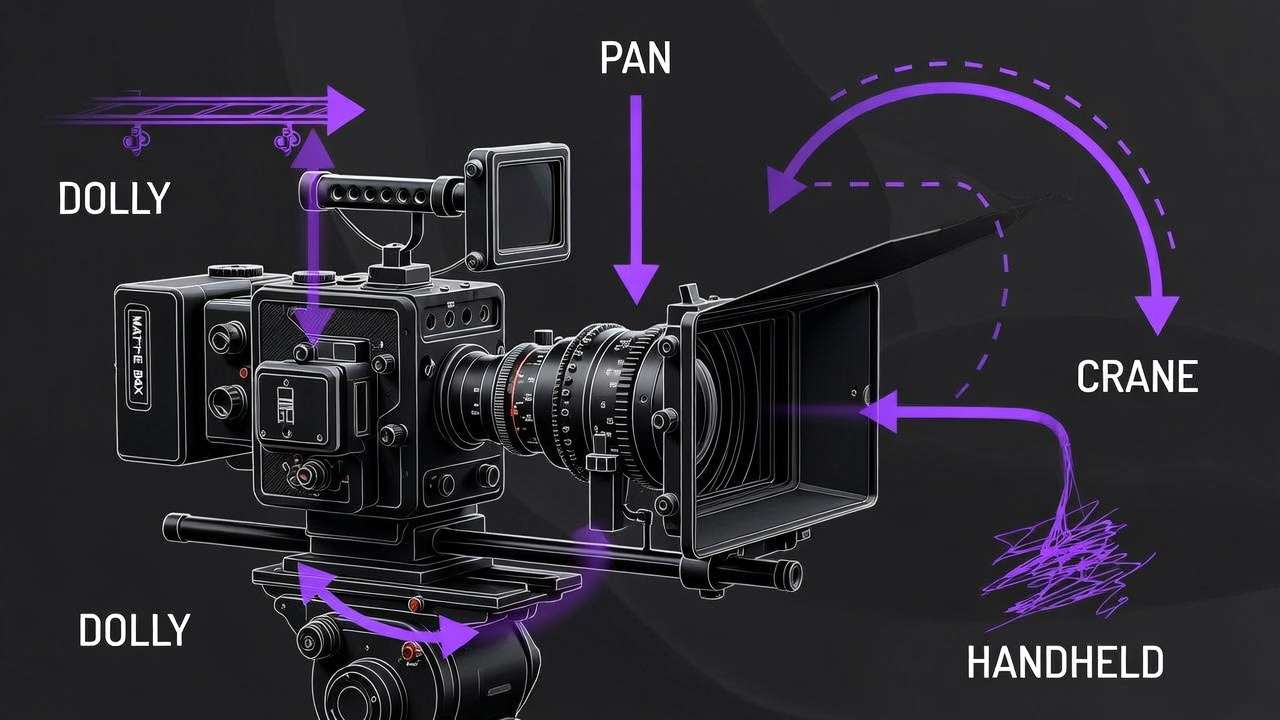
| Handheld | "handheld documentary style", "slight natural camera shake" |
| Crane/aerial | "crane shot rising above", "aerial establishing shot" |
For a masterclass on camera movement control, see Motion Control Mastery: Camera Angles in AI Video. For advanced prompt structure, read our Prompt Engineering Masterclass.
Negative Prompts for Video
Negative prompts are even more important for video than for images. Common video artifacts - flickering, morphing faces, unnatural limb movement - can be suppressed:
Negative: jittery motion, morphing, flickering, frame inconsistency, distorted faces, unnatural movement, blurry, low quality, watermark
For complete negative prompt strategies, read our Negative Prompts Guide.
Seeds for Reproducible Video
When you find a video composition you like, lock the seed value to reproduce the same base structure while iterating on prompt details. This is essential for:
- Creating consistent video series (same visual style across episodes)
- Iterating on motion while keeping composition stable
- Building cohesive campaigns where multiple clips share an aesthetic
Learn seed control in depth in our Seeds & Consistency Guide.
Resolution, Duration, and Frame Rate Strategy
Getting resolution, duration, and frame rate right before you generate prevents expensive re-renders and ensures your video works perfectly on the target platform.
Resolution: Match Output to Purpose
| Resolution | Best For | Credit Impact |
|---|---|---|
| 720p | Prototyping, drafts, speed-tier models | Lowest cost |
| 1080p | Social media, web content, most professional uses | Standard cost |
| 4K | Hero content, large displays, cinematic projection | Premium cost (2-4x) |
Most social platforms compress uploads to 1080p regardless of source resolution. Generating at 4K for a TikTok is wasting credits. Reserve 4K for campaign hero videos, presentations on large screens, or content requiring heavy cropping.
For the full technical breakdown, see AI Video Resolution: 720p vs 1080p vs 4K.
Duration: Shorter Is Almost Always Better
| Duration | Best For | Cost Multiplier |
|---|---|---|
| 5 seconds | Social hooks, product reveals, GIFs | 1x (base) |
| 8-10 seconds | Instagram Reels, TikTok clips, ads | 1.5-2x |
| 15-20 seconds | YouTube intros, longer narratives | 3-4x |
Most AI video models produce optimal quality at 5-8 seconds. Extending beyond 10 seconds often introduces motion degradation. For longer content, generate multiple 5-8 second clips and edit them together rather than forcing a single long generation.
Read the complete strategy in Video Duration: 5s vs 10s vs 15s Compared.
Frame Rate: Content Dictates Choice
| Frame Rate | Look and Feel | Best For |
|---|---|---|
| 24fps | Cinematic, film-like motion | Narrative content, ads, cinematic sequences |
| 30fps | Smooth, natural, standard broadcast | Social media, general web content |
| 60fps | Ultra-smooth, hyper-real | Sports, fast action, gaming content |
Cinematic content almost always benefits from 24fps. Social media content works well at 30fps. Higher frame rates consume more credits proportionally.
See our full analysis in Frame Rate in AI Video: 24fps vs 30fps vs 60fps.
Platform-Specific Video Formats
Each social platform has specific requirements for video dimensions, duration, and pacing. Creating in the wrong format means awkward cropping, wasted screen real estate, or algorithmic penalties.
| Platform | Aspect Ratio | Optimal Duration | Pacing Notes |
|---|---|---|---|
| TikTok | 9:16 (vertical) | 15-60s (hook in first 2s) | Fast cuts, immediate engagement |
| Instagram Reels | 9:16 (vertical) | 15-90s | Polished aesthetic, trend-aware |
| Instagram Stories | 9:16 (vertical) | Up to 15s per segment | Quick, casual, authentic feel |
| YouTube | 16:9 (horizontal) | 30s-10min+ | Higher production value, pacing varies |
| YouTube Shorts | 9:16 (vertical) | Under 60s | Vertical, punchy, mobile-first |
| Facebook Feed | 1:1 or 4:5 | 15-60s | Autoplay without sound, captions needed |
| Facebook/IG Ads | 1:1, 4:5, or 9:16 | 6-15s (conversion focus) | CTA-driven, fast messaging |
| 1:1 or 16:9 | 30s-3min | Professional tone, value-led |
Set your aspect ratio BEFORE generating. Changing it after generation means re-rendering from scratch. For a comprehensive guide to aspect ratio optimization across all platforms, see Aspect Ratio Mastery: Optimize Videos for Every Platform.
For platform-specific workflow guides:
- YouTube Creator Workflow: Complete Guide
- Instagram Reels: AI Video Creation Guide
- TikTok Creator: Viral AI Video Strategy
- Facebook & Instagram Video Ads: Performance Guide
- Best AI Models for Social Media Videos
Professional Video Production Pipelines
Professional creators don't generate standalone videos. They build pipelines - systematic sequences of models chained together - where each step leverages a different model's strength. This multi-model approach is what separates amateur AI video from professional output.
The Image-to-Video-to-Upscale Pipeline
The most powerful and widely used professional pipeline:
Step 1: Generate the base image (4-22 credits) Use Imagen 4 for photorealism, Flux 2 for complex compositions, or Midjourney for artistic style. Perfect the composition, lighting, and framing.
Step 2: Validate before committing (0 credits) Review the base image. Does the composition work? Is the subject positioned correctly? Fix issues at the image stage where iterations cost 10x less than video re-renders.
Step 3: Animate with a video model (cost varies widely by model - confirm in app) Feed the validated image into Kling 2.6 (social content), Veo 3.1 Quality (cinematic content), or Hailuo 2.3 (stylized content). Add motion direction in the prompt.
Step 4: Upscale and enhance (20-40 credits) Run the output through Topaz Video Upscaler for resolution enhancement, or use color grading techniques to achieve a cinematic look.
Total pipeline cost: 84-562 credits for a professional-quality video clip.
For the complete pipeline walkthrough, read Chaining Image, Video & Upscaling Models. For the image-to-video step specifically, see our Image-to-Video Workflow Guide.
The One-Image, Multiple-Videos Strategy
A single strong base image can spawn dozens of video variations - different camera movements, speeds, and styles - at a fraction of the cost of generating each from scratch.
Read the full strategy in One Image, Multiple Videos: Maximize Output from a Single Generation.
Scaling Video Production
For creators and agencies producing high volumes of video content daily:
- Batch similar requests with template prompts and systematic variations
- Build prompt libraries organized by content type, platform, and style
- Use speed-tier models for all drafts, reserve premium for finals only
- Establish review checkpoints before each expensive pipeline step
For agency-specific scaling strategies, see Agency Video Scaling: Multi-Model Production at Volume. For complete production workflows, read Professional Video Production on Cliprise.
For the strategic evolution from individual prompts to systematic production, see From Prompt Optimization to System Optimization and AI Video Generation Pipelines.
Video Generation Pricing and Cost Optimization
Video generation is the most credit-intensive activity on any AI platform. Understanding the cost structure and optimizing your workflow can reduce video production costs by 60-80% without sacrificing quality.
Credit Cost Overview by Model
Consumer credits below match the public pricing.json snapshot; tiers still depend on resolution, duration, and sound options - the app always shows the exact debit before you generate.
| Model | Typical consumer credits (indicative) | Notes |
|---|---|---|
| Seedance 1.5 Pro / Pro Fast | 8-130 | Strongly tiered by length & res |
| Hailuo 02 | 22-90 | Tiered by resolution & length |
| Sora 2 | 160-480 | 4s / 8s / 12s at 40 credits/s |
| Kling 2.5 Turbo | 76-152 | 5s vs 10s clip |
| Hailuo 2.3 | 54-162 | Tiered |
| Kling 2.6 | 99-396 | With/without sound tiers |
| Veo 3.1 Fast | 108 / video | Per completed video |
| Runway Gen4 Turbo | 198-396 | 5s vs 10s |
| Wan 2.6 | 140-630 | Resolution × duration |
| Veo 3.1 Quality | 720 / video | Per completed video |
| Sora 2 Turbo | 270-1,134 | Quality × duration tiers |
Rough dollar math: 1 credit ≈ $0.0111 list, or ~$0.0086 effective on Pro (3,500 credits for $29.99) - use for estimates only.
Five Rules for Cost Optimization
-
Never prototype with premium models. Use Seedance or Kling Turbo for drafts. Switch to Veo Quality or Sora Pro only for the final render.
-
Always validate with images first. Generate a base image for a few credits (often 2-44 depending on model). Validate the composition. Then animate - video clips are usually far more expensive. Skipping image validation wastes premium video credits on bad compositions.
-
Generate shorter clips. A 5-second clip costs roughly half what a 10-second clip costs. For many use cases - product reveals, social hooks, ads - 5 seconds is sufficient.
-
Use the right resolution for the platform. Generating 4K for TikTok wastes credits. Most social platforms compress to 1080p anyway.
-
Batch and template. Reuse prompt structures with systematic variations instead of writing from scratch each time.
For the complete cost optimization strategy, read our Cost Optimization Guide: Maximize Credits on Multi-Model Platforms. For understanding credit systems, see our Pricing page.
Industry-Specific Video Applications
AI video generation serves fundamentally different purposes across industries. The model choices, workflow patterns, and output requirements vary significantly.
Marketing and Advertising
Marketing teams rely on an ai video creator to scale content production across platforms without scaling headcount. Key workflows include social media video at volume, performance-driven video ads, and campaign asset generation.
- Facebook & Instagram Ad Videos: Complete Performance Guide
- YouTube Creator Workflow: AI Video Generation 2026
- From One Prompt to Full Campaign
- Marketing Agency: 80% Cost Reduction with AI Video
E-Commerce and Product Videos
Product videos drive conversions. AI generation eliminates the need for physical photoshoots while enabling rapid iteration across product lines and seasonal campaigns.
- Creating E-Commerce Product Videos
- Professional Video Production on Cliprise
- Fashion Brand Lookbooks: AI Video & Image Pipeline
Real Estate
Property marketing with AI video increases listing engagement. Virtual staging, neighborhood flyovers, and property tours become possible without expensive production crews.
- AI Real Estate Photos & Video 2026: Complete Guide →
- Real Estate Video Marketing with Cliprise
- Selling Houses with AI Property Videos
Architecture and Interior Design
AI accelerates visualization from sketch to photorealistic animated render, enabling architects and designers to present concepts as immersive video experiences.
- Architecture Visualization: Sketch to Photorealistic Render
- Interior Design AI Workflow: Transform Spaces in Minutes
Education and Journalism
Emerging applications include educational explainer videos and newsroom visual production.

Freelancers and Agencies
Solo creators and agencies make ai videos to compete with larger production houses at a fraction of the cost.
- Freelancer AI Content: Building a $5K/Month Practice
- Agency Video Scaling: Multi-Model Production at Volume
- TikTok Creator: Viral AI Video Strategy
Mobile Video Generation
AI video generation on mobile produces the same quality output as desktop. Cliprise supports full video model access on both iOS and Android, so you can generate professional video from anywhere.
Mobile video generation is particularly powerful for:
- Capturing inspiration and generating immediately
- Social media creators who produce and post on the same device
- Remote work and on-location production
- Quick iterations between meetings or during travel
For a practical app-selection checklist, use the AI video generator app guide before building a phone-first video workflow.
Getting Started on Mobile
- AI Video Generation on Mobile - Complete mobile video workflow
- Mobile App Tutorial: Generate Videos on iPhone - iOS-specific guide
- Mobile Prompting Mastery - Touch-optimized techniques including voice input
- AI Models on Mobile: Selection Guide - Which models work best on mobile connections
- Mobile Troubleshooting - Solve common mobile issues
For credit management on mobile, see our Mobile Credits & Subscriptions Guide.
Common AI Video Generation Mistakes
These are the errors that waste the most credits and produce the worst results. Avoid them and you're already ahead of 90% of AI video creators.
Mistake 1: Skipping Image Validation
Generating video directly from text without first validating the composition as an image. A failed 5-second video at 200+ credits hurts far more than a failed image at 8 credits. Always prototype the first frame.
Mistake 2: Using Premium Models for Drafts
Running Veo 3.1 Quality or premium Sora tiers for concept exploration burns through credits at many times the rate of budget/speed-tier models. Prototype with Seedance or Kling Turbo first.
Mistake 3: Writing Static Prompts
Describing a scene without motion instructions produces videos where nothing happens. Always include camera movement, subject action, and environmental motion in video prompts.
Mistake 4: Ignoring Aspect Ratio
Generating in 16:9 when the target platform is TikTok (9:16) wastes the entire generation. Set aspect ratio before generating - you cannot crop a horizontal video into vertical without losing 60%+ of the frame.
Mistake 5: Forcing Long Durations
Pushing for 15-20 second clips when the model produces optimal quality at 5-8 seconds. Longer clips introduce motion degradation. Generate multiple shorter clips and edit them together instead.
Mistake 6: Single-Model Thinking
Using one model for everything when different models excel at different tasks. A multi-model approach consistently outperforms single-model reliance.
For a deeper analysis, see The Biggest AI Video Mistake Creators Make and Model Selection Mistakes That Waste Credits.
Frequently Asked Questions
What is the best AI video generation model in 2026? There is no single best model - it depends on your use case. Veo 3.1 Quality leads for cinematic realism. Sora 2 family excels at narrative content. Kling 2.6 is a strong value for social media video. Hailuo 2.3 leads for stylized content. See our complete model comparison table above.
How much does AI video generation cost? On Cliprise, video generation costs 20-1,136 credits per clip depending on the model, duration, and quality setting. On the Pro Plan ($29.99/month, 3,500 credits), you can generate approximately 17-175 videos per month. See our pricing breakdown above.
Can I use AI-generated videos commercially? Yes. All paid Cliprise plans include full commercial usage rights for generated video content, subject to model provider terms and our Terms of Service. For detailed copyright guidance, see Safety & Copyright in Learn → Best practices (linked from the step-by-step video guide’s related list).
What is the difference between text-to-video and image-to-video? Text-to-video generates motion directly from a text description. Image-to-video starts with a static image and adds motion to it. Image-to-video gives you more compositional control and generally produces more predictable results. See our detailed comparison above.
How long can AI-generated videos be? Most models generate clips of 5-20 seconds. Sora and other premium tiers may support longer runs - see model settings in the app. For longer content, generate multiple clips and edit them together. Duration limits by use case are linked from the step-by-step video guide’s related list.
Can I create ai video on my phone? Yes. Cliprise supports full video generation on iOS and Android with access to all 22+ video models. The mobile video workflow guide is linked from the step-by-step generator page below.
What resolution can AI videos be generated at? Most models support 720p and 1080p output. Veo 3.1 Quality and Veo 3 support up to 4K. For social media, 1080p is optimal. The 720p / 1080p / 4K guide is linked from the step-by-step video guide’s related list.
How do I make AI videos look cinematic? Use camera movement keywords in prompts (dolly, tracking, crane), specify 24fps for film-like motion, control lighting and color palette in your prompt, and use premium-tier models (e.g. Veo 3.1 Quality or Sora 2 Turbo) for the final render. The cinematic workflow write-up is linked from the step-by-step video guide’s related list.
Is Cliprise cheaper than using video AI tools individually? Significantly. Direct access to Sora 2 through OpenAI costs ~$200+/month for comparable usage. Runway costs $95+/month. Using multiple tools individually costs $300-500+/month. Cliprise Pro provides access to all models for $29.99/month. Current plans are on the site Pricing page (linked from the step-by-step video guide’s related list).
What to Read Next
This guide covered the fundamentals and advanced strategies for AI video generation. Based on your experience level, here's what to explore next:
If you're new to AI video: Open Best AI Video Models on Cliprise 2026 and use its Related list for quick start, image-to-video, and the ranked model index.
If you're ready for professional workflows: The same page chains to Veo 3.1 deep tutorial, multi-model workflows, and motion-control mastery without duplicating links here.
If you're scaling production: Agency scaling, credit optimization, and pipeline frameworks are also listed there.
Explore the rest of Learn from the site navigation.
More reading (off this page): How to generate AI video (step-by-step) holds practical walkthroughs, news, matchups, duration/resolution/copyright follow-ups, and pricing pointers. For the budget-creator angle, use the cheap-AI-video guide in Learn → Getting started (same related block as that step-by-step page).