AI Video Generator: Text-to-Video and Image-to-Video in One Place
Access Kling 3.0, Sora 2, Veo 3.1, Seedance 2.0, HappyHorse 1.0, Wan 2.6, and Runway Gen4 from a single Cliprise workspace. Compare models on the same brief. One credit balance, no separate subscriptions.
30 credits on signup, then 10 free daily credits. No subscription required to start.
What is an AI video generator?
How Cliprise routes text and stills into short MP4 clips across multiple video models.
An AI video generator takes text descriptions or static images and produces short video clips using diffusion-based neural networks. These systems learn from millions of video sequences how objects move, how light changes across time, and how scenes evolve, then apply that learning to your prompt.
The critical technical challenge is temporal consistency: keeping a subject recognizable and physically plausible from frame to frame, without flickering, morphing, or unstable edges. Production-level models now handle multi-second coherent sequences at resolutions from 720p up to 4K on select models (verify in the app).
On Cliprise, AI video generation means you pick a model, write a prompt or upload a reference image, and generate. The platform handles API routing, credit billing, and output delivery. You compare results across models without managing separate accounts or subscriptions.
Text-to-video
A text prompt generates the full scene. Good for concept exploration, B-roll, and footage that cannot be filmed. When the brief starts from text instead of a still image, use our best text-to-video AI generators guide to compare model routes by workflow before spending credits on production batches.
Image-to-video
A static image is animated based on a prompt. Good for brand asset animation, product images, and cases where composition must be exact. See the Image-to-Video AI Generator for a dedicated workflow guide.
Text-to-video on Cliprise
Write a prompt, pick a model, and compare how different engines interpret the same brief.
Concept exploration
Test multiple creative directions without shooting. Strong for B-roll and impossible scenes.
Prompt specificity
Camera angles, lighting, subject behavior, and shot framing drive output quality more than length alone.
Model comparison
The same prompt can look cinematic, stylized, or motion-heavy depending on the model you select.
Text-to-video on Cliprise means writing a prompt and selecting a model. Different models interpret the same prompt differently. Comparing a few outputs before committing to a model is often worth the credit cost.
Prompt vocabulary that improves results:
- Camera movement: slow dolly forward, static wide shot, handheld tracking, crane rising
- Lighting: golden hour backlight, soft diffused overhead, dramatic rim light
- Framing: medium shot, extreme close-up, establishing wide angle
- Subject behavior: walks left to right across frame, turns toward camera, product rotates slowly
- Atmosphere: morning mist, dust particles in sunlight, rain on glass surface
Available text-to-video models on Cliprise (verify current availability in app): Kling 3.0, Sora 2, Veo 3.1 Quality, Seedance 2.0, HappyHorse 1.0, Wan 2.6, Runway Gen4 Turbo.
Image-to-video on Cliprise
Animate stills when composition, lighting, and subject identity must stay locked.
Image-to-video starts with a static image and animates it. The source image controls composition, lighting, subject identity, and style. The model adds motion on top of that fixed visual. This is the right path when you cannot afford to let the AI invent the scene from scratch.
- Animate a product photo for an ecommerce ad
- Add motion to an AI-generated image from the AI Image Generator
- Animate a logo or brand asset into a short loop
- Create social content from an existing still campaign
Not every model on Cliprise supports image-to-video. Check the model page or the Cliprise app before building an image-to-video workflow around a specific model. For a focused guide, see the Image-to-Video AI Generator page.
Models worth testing for image-to-video (verify in app): HappyHorse 1.0, Kling 3.0, Wan 2.6, Sora 2, Seedance 2.0.
How Cliprise video generation works
Five steps from model pick to comparison on unified credits.
Pick a model
Open the Cliprise app and select a video model. The models page lists current options with capability summaries.
Choose input type
Text-to-video uses a prompt. Image-to-video uploads a reference still plus a motion prompt. Not all models support both.
Set duration and aspect
Clip length and aspect ratio (16:9, 9:16, 1:1) vary by model. The app shows available options before you generate.
Generate and review
Generation time varies by model, clip length, selected quality tier, and current queue. Download MP4 when ready.
Compare if needed
Switch models and regenerate with the same prompt. One credit balance covers all routes.
Credits are deducted at generation time. Cost depends on model, clip length, and resolution tier. See pricing for plan details. Duration, resolution, aspect ratio, audio support, and credit cost depend on the selected model.
Best AI video models to test by workflow
A starting point for testing, not a definitive ranking. Output quality is context-dependent.
| Workflow | Models worth testing first | Why | Model page |
|---|---|---|---|
| Cinematic short clips, photorealistic | Sora 2, Veo 3.1 Quality | Strong temporal coherence, realistic physics and lighting | |
| Native 4K output | Kling 3.0 | Native 4K on supported tiers, up to 15s clips, storyboard, integrated audio where supported | |
| Product teasers, reference-driven, image animation | HappyHorse 1.0 | Image-to-video, reference input, 3-15s range | |
| Multimodal briefs with audio and image refs | Seedance 2.0 | Up to 12 simultaneous inputs, audio-video sync where supported in the app | |
| Fast stylized social shorts | Wan 2.6 | Text-to-video, image-to-video, video-to-video at 720p-1080p | |
| High-volume ad creative, fast iteration | Runway Gen4 Turbo | Fast generation, good for iteration volume |
No single model wins across all workflows. Run the same brief through two or three models and choose the one that fits the job. See the full models list for current availability.
AI video generator with audio
Audio output is model-specific. Verify in the app before building audio-dependent workflows.
Audio in AI video is model-specific. Not every model on Cliprise generates audio as part of the video output.
Models with documented audio capabilities (verify in app):
- Kling 3.0 : integrated audio generation on the model page
- Seedance 2.0 : audio-video sync where supported; may accept audio file inputs in multimodal briefs
- HappyHorse 1.0 : synchronized audio-visual capabilities where supported (verify in the app)
- Veo 3.1 Quality : experimental synchronized audio output in the model description
For models without native audio
Generated video exports as a silent MP4. Add voiceover or music in post, or explore AI voice tools inside Cliprise when available. If synchronized audio at generation time matters, Seedance 2.0 and Kling 3.0 are good first tests.
Use cases
Match workflow to model tests rather than assuming one engine fits every channel.
Marketing videos
Brand awareness clips and launch teasers. Sora 2 and Veo 3.1 suit photorealistic brand content; HappyHorse 1.0 is worth testing for reference-driven teasers.
Product videos
Image-to-video from a clean product shot is often more reliable than text-only for ecommerce. HappyHorse 1.0 and Kling 3.0 are good first tests.
App promos
Animate mockup stills or generate background motion. Wan 2.6 and HappyHorse 1.0 are worth testing for app promo formats.
YouTube Shorts
Many models support 9:16; verify per model. Kling 3.0 supports native 4K on supported tiers and up to 15s for reframing; Wan 2.6 suits higher-volume Shorts.
TikTok and Reels
Fast visual dynamics matter. Test Wan 2.6 for iteration volume; Kling 3.0 when production quality is the priority; Seedance 2.0 when audio refs are part of the brief.
Concept videos
Text-to-video for mood and direction exploration. Sora 2 and Veo 3.1 Quality suit cinematic concepts; Seedance 2.0 when references and audio direction ship together.
Product-focused image animation is covered on the Image-to-Video AI Generator feature page and the ecommerce product photo to AI video workflow. For SaaS launch clips, see the AI SaaS product demo video workflow; for landing page loops, use the AI website hero video workflow.
Prompt examples
Starting points only. Output quality varies by model and generation settings.
“Slow 360-degree rotation of product, soft studio lighting, shallow depth of field, camera stays level, no background movement”
“Medium shot of a woman opening a minimalist box in a bright kitchen, golden hour window light, slow push-in camera, product reveal moment, no text, cinematic color grade”
“Abstract flowing gradient shapes in deep blue and purple, smooth slow-motion camera drift, no objects or people, loopable motion, 9:16 vertical”
“Aerial crane shot pulling back from a city at sunrise, dramatic light, fast opening motion slowing to still, 9:16 vertical format”
“Desert landscape at dusk, lone figure walking toward camera, dramatic wide angle, cinematic lens flare, atmospheric haze, subtle handheld movement”
Run each prompt through at least two models before choosing. The better output depends on which aesthetic matches your brief.
Built for short-form platforms
Create attention-grabbing content for Instagram Reels, TikTok, YouTube Shorts, and other vertical or square placements. Aspect ratio and clip length depend on the selected model; verify options in the app before batching.
Queue-aware production
Generation time varies by model, clip length, selected quality tier, and current queue.
Platform aspect ratios
Many models support vertical (9:16), square (1:1), and landscape (16:9). Confirm per model before building a Shorts workflow.
Credits and pricing
One credit balance for video, image, and audio. Credit cost per video varies by model, duration, and tier.
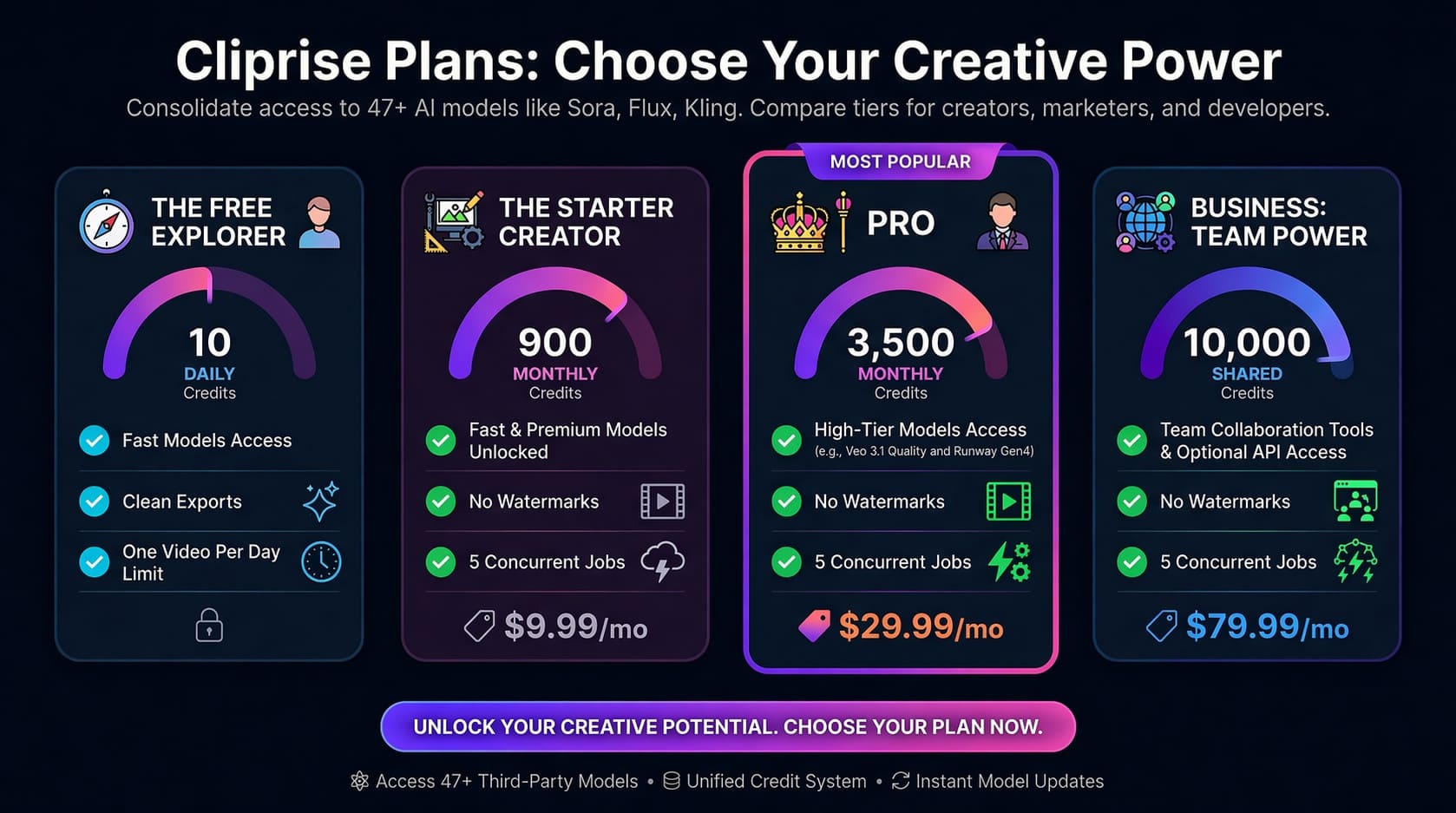
- Free: 30 credits on signup, then 10 daily credits. Premium models require a paid plan.
- Starter ($9.99/month): 900 credits per month. Includes Veo 3.1 Fast, Sora 2, Kling, and Wan.
- Pro ($29.99/month): 3,500 credits per month. Adds Veo 3.1 Quality and Runway Gen4 Turbo.
- Business ($79.99/month): 10,000 credits per month plus team features and optional API access.
Yearly plans save 50%. Credit cost per video varies by model, duration, and resolution tier. Commercial use is available on paid plans; review pricing for current numbers and commercial terms.
Watch: Creating a Full AI Ad
See the AI video generator in action with a step-by-step workflow
Creating a Full AI Ad with Cliprise - From Prompt to Cinematic Video
A deep-dive tutorial demonstrating how to create a professional 4K cinematic advertisement from scratch using multiple AI models.
Choose Your Plan
Illustrative overview of Cliprise plans. For exact current pricing and credit costs, use the live pricing page.
Frequently Asked Questions
Continue learning
Internal guides and model pages for deeper workflows.
Image-to-Video AI Generator
Dedicated guide for still-first workflows.
AI Image Generator
Generate source images to feed into video workflows.
All AI Models
Browse the full Cliprise model library.
AI Video Generation Complete Guide 2026
End-to-end workflows, settings, and production tips.
AI Video Storyboard Workflow
Plan shot order, first frames, motion, and review criteria before generating.
AI B-Roll Generator Workflow
Create useful B-roll for YouTube, ads, tutorials, and social clips.
AI Ad Creative Testing Workflow
Generate controlled ad variations, score them, and improve the next batch.
AI Video Hook Generator Workflow
Build stronger first frames and opening motion for ads, launch clips, and social posts.
AI Product Launch Video Workflow
Plan launch teasers, demo clips, hero loops, B-roll, and retargeting reminders.
AI Retargeting Video Ads Workflow
Create lower-funnel reminder creative for warm audiences and specific objections.
AI UGC Video Generator Workflow
Create safer creator-style ad concepts, product hooks, and testimonial-style drafts.
AI Website Hero Video Workflow
Plan loop-safe landing page video with strong first frames and mobile crops.
AI SaaS Product Demo Video Workflow
Turn screenshots, mockups, scripts, and support clips into clearer product demos.
AI App Promo Video Workflow
Turn approved screenshots, recordings, and mockups into product-accurate launch clips.
AI Testimonial Video Workflow
Build customer-proof clips from approved quotes, interviews, and product context.
AI Jewelry Product Video Workflow
Animate jewelry photos while reviewing stones, settings, metal, hardware, and scale.
Best AI Video Generator 2026 Comparison
Head-to-head model comparison for routing decisions.
Best Text-to-Video AI Generators
Compare text-to-video models by workflow, not hype.
Chinese AI Video Models
Why HappyHorse, Seedance, Kling, and Wan matter for real briefs.
Best Image-to-Video AI Generator
Compare image-conditioned video models.
Free Image-to-Video AI Generator
How free credits work for image-to-video tests.
Pricing
Credit costs, plan comparison, commercial use terms.
Start generating AI video on Cliprise
Compare text-to-video and image-to-video models on unified credits.
30 credits on signup, then 10 free daily credits.
Related Features
Tools that complement your AI video workflow
AI Image Generator
Generate source visuals for text-to-video and image-to-video workflows.
Image-to-Video AI Generator
Dedicated still-first workflow when composition must stay locked.
Styles
Explore cinematic looks quickly before committing to final renders.
Pro Image Editor
Refine keyframes and visual assets before video generation.