AI Art Generator: Your ideas, visualized beautifully
Transform text descriptions into stunning artwork spanning any style or medium. Whether you're creating gallery pieces or concept art, Cliprise brings your artistic vision to life.
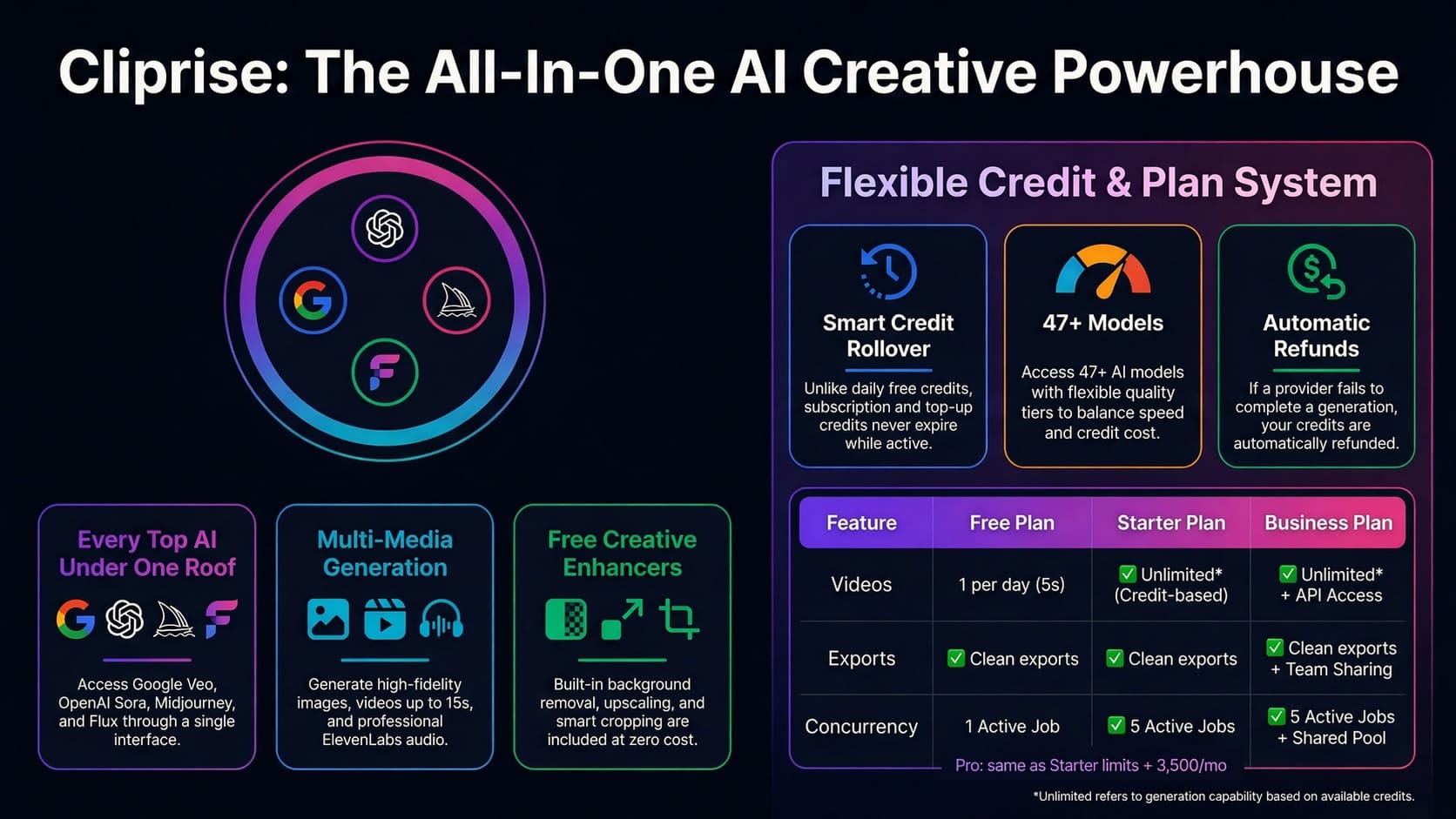
Complete AI Creative Toolkit
Art, video, editing, upscaling-all in one platform with unified credits.
Unlimited Artistic Expression
From traditional techniques to cutting-edge digital styles, create art in any aesthetic you can imagine
Style Mastery
Generate artwork in any style from photorealism to abstract, impressionism to anime, watercolor to digital painting.
Color Control
Direct control over color palettes, harmonies, and mood. Apply cinematic color grading or create custom color schemes.
Composition Tools
Advanced composition controls for rule of thirds, golden ratio, focal points, and visual flow.
From Concept to Gallery-Ready
The AI Art Generator is perfect for artists, designers, and creators who want to explore new artistic directions or rapidly visualize concepts. Whether you're creating pieces for exhibition, book illustrations, album covers, or personal projects, our AI understands artistic intent and technical execution.
Print-Ready Output
Generate high-resolution artwork suitable for prints, canvas, or any physical medium.
Iterative Refinement
Use Styles for rapid exploration, then refine winners with your preferred model for final quality.
Popular Art Styles
Explore our most-used artistic styles and techniques
Digital Painting
Modern digital art with painterly brushwork and rich color
Oil & Acrylic
Classical painting techniques with visible brushstrokes and texture
Watercolor
Delicate washes, bleeding colors, and transparent layers
Concept Art
Professional concept art for games, film, and entertainment
Anime & Manga
Japanese animation and comic art styles with cell shading
Abstract
Non-representational art focusing on form, color, and emotion
Creative Freedom
Tools and features designed for artistic exploration
Style Mixing
Blend multiple artistic styles
Color Palettes
Custom and preset palettes
Aspect Ratios
Any format from square to panoramic
Image Prompts
Use references for style guidance
Learn & Master AI Art Generation
Guides and resources to help you create professional artwork
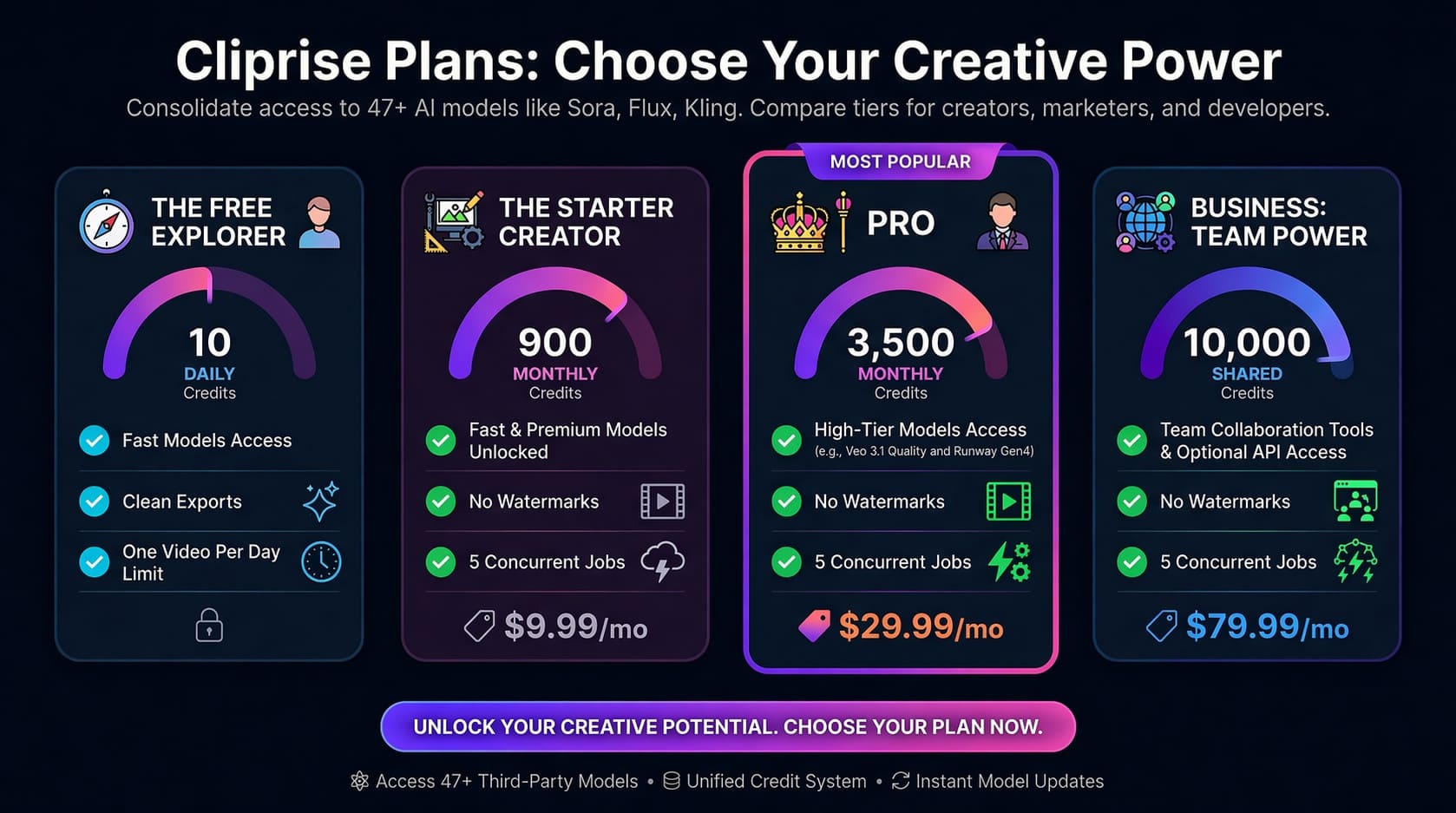
Choose Your Plan
From free experimentation to professional production - find the perfect plan for your AI art generation needs.
Frequently Asked Questions
AI Image Generator & AI Art Generator Explained
What Is an AI Image Generator?
An AI image generator uses diffusion-based neural networks trained on billions of images to convert text descriptions or reference images into high-resolution visuals. Instead of retrieving stock images, it synthesizes entirely new compositions based on learned statistical patterns in lighting, texture, perspective, and subject relationships.
The process starts with structured noise-essentially visual static-and progressively refines it through hundreds of denoising steps. Each step moves the image closer to matching the prompt description while maintaining internal consistency. A language model parses your text input into semantic embeddings that guide this refinement process, activating learned concepts about objects, styles, compositions, and lighting conditions.
Modern text-to-image AI systems understand composition principles, depth of field, cinematic lighting, artistic styles, and brand-like aesthetics. They can simulate specific camera lenses, replicate painting techniques, generate photorealistic product shots, or create illustrated characters. The result is production-ready content generated in 15-30 seconds rather than hours of manual design work.
Different models in the AI models library specialize in distinct capabilities-photorealism, illustration styles, architectural rendering, character design, or abstract art. Understanding these specializations lets you route prompts to optimal generators for specific project requirements. For technical workflows and advanced techniques, explore the comprehensive AI image generation guide.
Text-to-Image vs Image-to-Image
Text-to-image AI generates visuals from natural language descriptions alone. You write a prompt, the system synthesizes a complete image matching that description. This approach excels at conceptual exploration, rapid iteration, and creating visuals that don't exist-fantasy scenes, product concepts, branding experiments, or stylized interpretations.
Image-to-image AI transforms or enhances existing visuals using text guidance. You provide a source image (photograph, sketch, screenshot, or generated image), then describe how to modify it. The system maintains structural elements from the source while applying changes-style transfer, upscaling, background replacement, lighting adjustments, or compositional refinements.
When to use text-to-image:
- Exploring multiple creative directions without existing assets
- Generating hero images, social content, or advertising concepts from scratch
- Creating variations on abstract ideas or verbal descriptions
- Rapid prototyping for client presentations or internal reviews
When to use image-to-image:
- Enhancing photographs with specific style treatments or lighting changes
- Upscaling low-resolution images to 4K while adding detail
- Transforming sketches or wireframes into polished visuals
- Maintaining brand consistency by modifying existing approved assets
- Creating variations of successful designs with controlled changes
Production workflows combine both: Generate initial concepts with text-to-image, select the best results, refine them through image-to-image iterations. This two-stage approach balances creative exploration with precise control, delivering higher-quality final outputs than using either method alone.
Image vs Art: Pick Your Workflow
Use AI Art Generator when you want stylized and medium-specific artwork - illustration, painting, concept art, anime, and abstract aesthetics. Use AI Image Generator when your goal is photoreal, production-grade imagery for marketing, product photography, and thumbnails. If you're unsure, match the words in your prompt to the style you want, then compare outputs across models.
| AI Art Generator | AI Image Generator |
|---|---|
| Best for: artistic concepts and stylized visuals | Best for: photoreal products and clean marketing visuals |
| Prompt focus: medium/style, artist feel, creative mood | Prompt focus: lighting, lens cues, materials, realistic detail |
| Output vibe: art-first interpretation and stylization | Output vibe: photographic realism and production consistency |
Prefer photoreal images instead? Switch to AI Image Generator →
What Makes High-Quality AI Art?
Professional-quality outputs depend on understanding how AI art generators interpret prompts and what technical factors influence results:
- Lighting control: Specify direction, quality, and mood-"golden hour side-lighting," "dramatic rim light," "soft diffused overhead," "studio three-point lighting." Generic "good lighting" produces generic results.
- Lens simulation: Reference focal lengths and camera characteristics-"85mm portrait lens shallow depth of field," "wide-angle 24mm distortion," "macro photography detail." This activates learned patterns from professional photography.
- Composition framing: Use visual terminology-"rule of thirds," "centered symmetry," "Dutch angle," "negative space," "leading lines." Trained models understand these principles from millions of well-composed images.
- Prompt specificity: Detail matters. "Forest scene" is vague. "Misty pine forest at dawn, dappled sunlight through canopy, moss-covered fallen logs in foreground, atmospheric depth" guides generation precisely.
- Seed consistency: Seeds control randomness. Lock seeds to maintain composition while varying other elements. Build a library of effective seeds for recurring project types.
- Model selection: Different models excel at different content. Photorealistic portraits require different generators than abstract illustrations or architectural renders. Test across the available AI models to find optimal matches.
Quality also depends on avoiding common mistakes: overloaded prompts dilute focus, conflicting instructions create compromises, using maximum quality for rapid iteration wastes time. Strategic parameter choices based on content requirements deliver better results than defaulting to highest settings universally.
Multi-Model Advantage
Single-model platforms limit you to one system's strengths and weaknesses. If that model struggles with human faces, every portrait faces this constraint. If stylization is weak, you cannot access alternatives without switching platforms and relearning interfaces.
Multi-model platforms provide strategic flexibility. Route photorealistic product shots to models excelling at commercial photography aesthetics. Generate illustrated brand content with models optimized for artistic styles. Create architectural visualizations using systems trained on design and rendering datasets. This approach delivers better results than forcing one AI art generator to handle every scenario.
Comparison-driven workflow: Generate the same prompt across multiple models, compare outputs side-by-side, identify which interpretation best serves your project. This develops intuition about model capabilities faster than relying on single systems. You learn which models suit portrait photography, which handle abstract art, which create clean typography, which maintain brand consistency.
Risk distribution matters too. No single model failure disrupts workflow. If one provider experiences downtime or quality regression, switch to alternatives without changing tools. Project continuity doesn't depend on single vendors.
Choosing Settings
Generation parameters balance output requirements, processing speed, and platform constraints:
Aspect ratios for different uses:
- 1:1 (square): Instagram feed posts, Facebook, profile images, universal social compatibility
- 4:5 (portrait): Instagram feed optimized, Pinterest, mobile-first content
- 16:9 (landscape): YouTube thumbnails, website headers, presentations, desktop wallpapers
- 9:16 (vertical): Stories, mobile wallpapers, vertical video thumbnails
- Custom ratios: Print materials, specific design requirements, brand templates
Resolution choices:
- 1024x1024 or 1536x1536: Fast iteration, social media posts, web content
- 2048x2048: High-quality social, moderate print applications
- 4K (3840x2160): Professional deliverables, large format print, detailed product shots
- Higher resolution increases generation time proportionally-use appropriately for output purpose
Batch generation:
Generate multiple variations simultaneously to explore creative directions efficiently. Batch settings let you test different seeds, slight prompt variations, or model comparisons without sequential waiting. This accelerates iteration cycles during concept development.
Standard vs high-quality mode:
- Standard quality: 15-20 second generation, sufficient for concept exploration and rapid testing
- High quality: 30-45 second generation, increased detail fidelity, better for final deliverables
- Strategic approach: iterate at standard quality, regenerate final selections at maximum quality
- This workflow reduces total project time by 40-60% compared to always using highest quality
Cost optimization follows similar logic. Standard quality uses fewer compute resources, making it more economical for high-volume generation or exploratory work. Reserve premium quality for assets that will be client-facing, published, or require maximum detail. Review pricing plans to understand credit usage across different quality settings and match your generation volume to appropriate subscription tiers.
Common Mistakes to Avoid
- Generic prompts: "Nice portrait" produces generic results. Specify lighting, expression, background, style. "Professional headshot, soft window light from left, neutral expression, blurred office background, shallow depth of field."
- Overloading with details: Prompts listing fifteen objects dilute focus. Models prioritize unpredictably. Start with core elements, add complexity through iterations.
- Ignoring negative prompts: Specify what to exclude-"no watermarks, no text, no blur, no distortion." This guides generation away from common artifacts.
- Wrong model for content type: Photorealistic models struggle with illustration styles. Artistic models may not achieve commercial photography aesthetics. Test across models for project-specific requirements.
- Not iterating: First attempts rarely achieve perfection. Professional workflows include 3-5 generation rounds with progressive prompt refinement based on results.
- Always using maximum settings: High resolution and quality for every generation wastes time during exploration. Use standard settings for iteration, upgrade for finals.
Understanding these technical considerations-from model selection to parameter tuning-transforms AI image generators from random output machines into precise creative tools. The learning curve compresses dramatically when you approach generation systematically rather than hoping for lucky results.
Start your artistic journey
Create stunning artwork with AI-powered tools built for artists
Related Features
Complement your art workflow with production tools
AI Image Generator
Create production-ready visuals and marketing assets from prompts.
Styles
Explore artistic directions quickly with preset visual parameters.
Pro Image Editor
Polish, annotate, and finalize artwork without leaving your workflow.
Universal Upscaler
Enhance art output to high-resolution formats for print and portfolio use.