AI Image Generator: Create stunning images in seconds
Professional AI image generation with 20+ models. Text-to-image, image-to-image, upscaling, and editing in one platform. Create marketing visuals, product photos, and thumbnails that drive results.
From Prompt to Production-Ready
Complete image creation workflow in one platform
20+ Image Models
Access DALL-E 3, Flux 2, Imagen 4, Ideogram V3, and more in one place. Compare outputs side-by-side and switch models without changing workflows.
Text & Image Inputs
Generate from prompts or transform existing images. Text-to-image for new concepts, image-to-image for refinements, style transfer and variations.
Complete Workflow
Generate, edit, upscale, export-all in one platform. Built-in editor, AI upscaler to 4K, background removal, and batch processing.
Generate, Edit, Upscale & Export
Create images from text prompts or transform existing visuals using 20+ AI models. Refine with the built-in editor, remove backgrounds, or apply style adjustments. Upscale to 4K resolution and export in optimized formats for any platform.
1. Generate
Text-to-image or image-to-image with 20+ models. View all models →
2. Edit
Built-in editor, background removal, style adjustments. Image editor →
3. Upscale & Export
Upscale to 4K, export for any platform. Universal upscaler → (upscale workflow guide)
Text-to-Image vs Image-to-Image
Two powerful approaches for different creative needs
Text-to-Image
Generate complete images from written descriptions. Ideal for creating new concepts from scratch, exploring multiple creative directions rapidly, and generating visuals that don't exist.
- Explore creative directions rapidly
- Generate marketing concepts and hero images
- Create visuals that don't exist yet
- No source images required
Image-to-Image
Transform existing images with text guidance. Maintain structure while applying style transfer, upscaling, background replacement, lighting adjustments, or compositional refinements.
- Style transfer and artistic transformations
- Upscale low-resolution images to 4K
- Refine and iterate on existing designs
- Maintain brand consistency
Best For
Professional image generation for every creative need
Product Photography
Professional product shots without photoshoots
Marketing Creatives
Ad visuals, social posts, and campaign assets
Thumbnails & Headers
YouTube thumbnails, blog headers, and banners
Brand Concepts
Mood boards, design explorations, and visual direction
Technical Capabilities
Professional-grade image generation with full creative control
Max Resolution
Up to 3840×2160 pixels
Aspect Ratios
1:1, 4:5, 16:9, 9:16, custom
Batch Generation
Simultaneous variations
Consistency
Reproducible results
Popular Styles & Outputs
From photorealistic products to stylized illustrations
Photorealistic Product
Commercial-grade product photography with studio lighting
Cinematic Portrait
Dramatic character portraits with depth of field and cinematic lighting
Illustration & Anime
Stylized art, vector-style graphics, and anime aesthetics
Logo & Typography
Text-inclusive designs with layout control (model-dependent)
Architecture Render
Architectural visualization, interior design, and space planning
Social Media Banner
Platform-optimized visuals for headers, covers, and promotional graphics
Learn & Master AI Image Generation
Comprehensive guides to help you create professional images
Turning stills into motion? See the image-to-video workflow guide.
AI Image Generation Complete Guide (2026)
Technical workflows, model selection, settings optimization, and production strategies
Top 5 Midjourney Alternatives 2026
Compare Cliprise, Adobe Firefly, Flux 2, Imagen 4 & DALL-E 3 for workflow and pricing
Best AI Image Generator 2026 (tested)
Rankings, trade-offs, and when to use which model
AI Prompt Engineering Complete Guide (2026)
Master prompt construction, negative prompts, and advanced techniques for consistent results
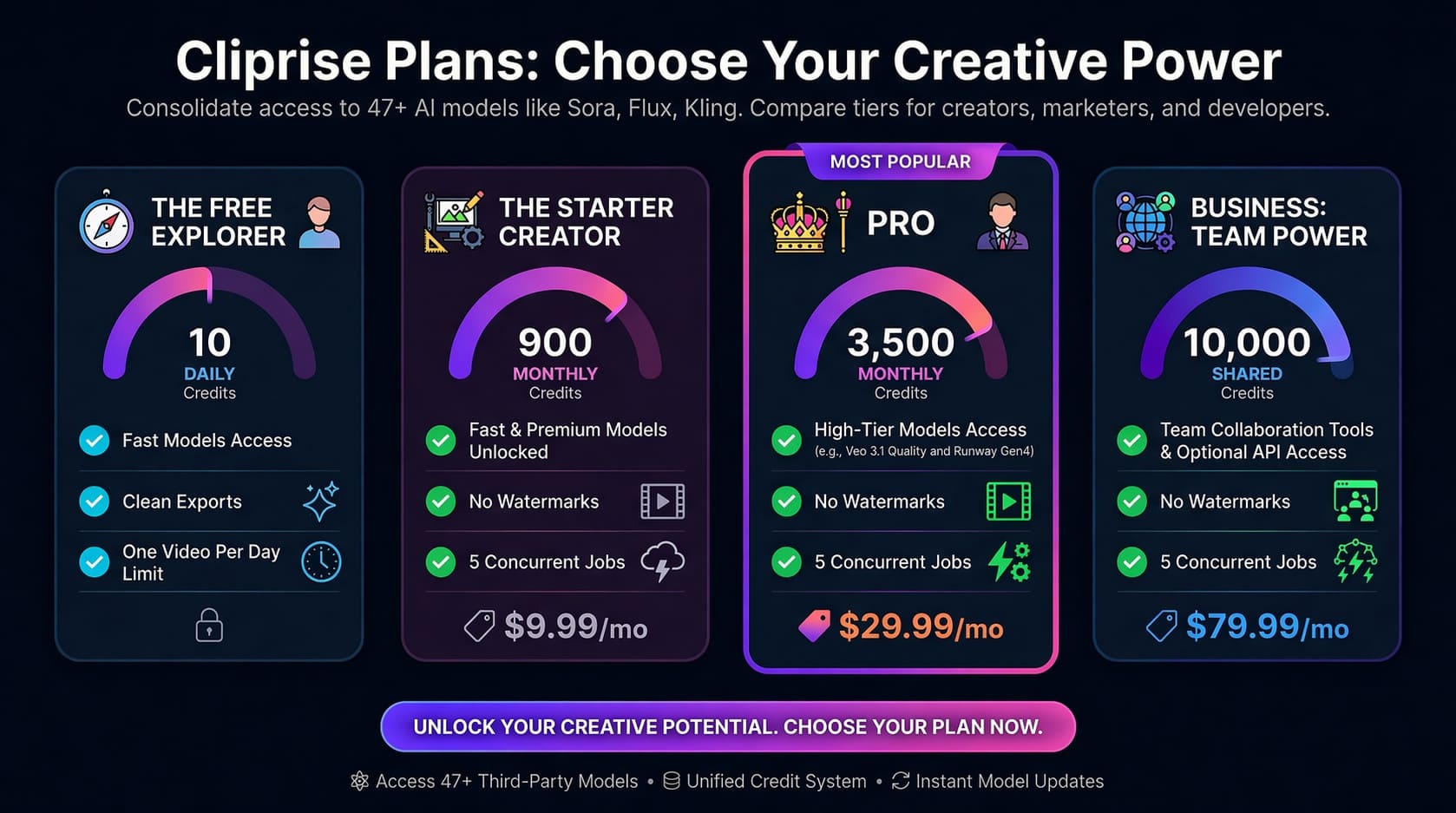
Choose Your Plan
From free experimentation to professional production-find the perfect plan for your image generation needs.
Frequently Asked Questions
AI Image Generator & AI Art Generator Platform Explained
A professional AI image generator does more than convert text into pictures. It translates structured language into visual composition, lighting logic, and spatial depth using diffusion-based neural networks trained on billions of image-text pairs. Instead of retrieving stock assets, the system synthesizes entirely new visuals frame-by-frame from learned statistical patterns.
Cliprise operates as a multi-model AI art generator platform, meaning you are not limited to one engine or visual style. Different models specialize in photorealism, illustration, commercial product rendering, architectural visualization, typography, or stylized art. You can compare results across the AI models library and select the interpretation that best fits your creative intent.
Image vs Art: Which Generator Should You Use?
Use AI Image Generator when your goal is production-ready visuals that look like photography (product shots, marketing creatives, and thumbnail-ready assets). Use AI Art Generator when your prompt is written like a medium or art brief (watercolor, oil painting, anime/manga, concept art, abstract styles) and you care more about style identity than literal realism. If you keep getting results that are "too literal" or "not stylized enough," switching to an art-first workflow usually gets you closer on the first render.
| AI Image Generator | AI Art Generator |
|---|---|
| Best for: photoreal products and production-grade marketing visuals | Best for: illustration, painting, anime, concept art, and stylized worlds |
| Prompt focus: lighting, lens/camera cues, materials, realistic detail | Prompt focus: medium/style, brushwork feel, character aesthetics, artistic mood |
| Output vibe: photographic realism and clean production consistency | Output vibe: strong visual identity, creative stylization, art-first interpretation |
Ready for art-first results? Switch to AI Art Generator →
How an AI Image Generator Works
Modern text-to-image AI begins with structured noise-essentially visual static-and iteratively refines it through denoising steps guided by semantic embeddings extracted from your prompt. Attention mechanisms allow the model to understand relationships between objects, lighting direction, material properties, and camera perspective.
When you write "85mm portrait lens, soft window light from the left, shallow depth of field," the system activates learned associations from professional photography datasets. Specific terminology dramatically improves output precision compared to generic descriptions.
Text-to-Image vs Image-to-Image Workflows
Text-to-image generation creates visuals from pure language input. This approach excels at concept exploration, marketing ideation, hero image creation, and generating visuals that do not yet exist.
Image-to-image generation transforms existing visuals. You provide a source image and apply stylistic, compositional, or lighting changes while preserving structure. This is ideal for upscaling, redesign, brand consistency, and controlled refinement.
Advanced workflows combine both: generate multiple concepts with text-to-image, choose the strongest variation, then refine it through image-to-image passes for professional output.
What Makes AI-Generated Images Look Professional
The difference between amateur and production-grade output usually comes down to specificity and model selection.
- Lighting language: golden hour, rim lighting, volumetric light, soft diffused studio
- Lens simulation: 35mm wide-angle, 85mm portrait lens, macro detail
- Composition control: rule of thirds, centered symmetry, negative space
- Seed management: maintain visual consistency across variations
- Model routing: test across multiple generators instead of forcing one system
Using the same prompt across multiple models helps you quickly identify which engine handles realism, stylization, or typography best. This comparison-driven workflow produces superior results compared to relying on a single generator.
Resolution, Aspect Ratios & Cost Optimization
Strategic parameter selection reduces both production time and credit consumption. Generate at standard quality during iteration, then re-render final selections at maximum resolution (up to 4K) for client delivery. After generating an image, use the image quality enhancement workflow to decide whether 2K, 4K, or higher-resolution export makes sense.
Common aspect ratios:
- 1:1 - social posts & general use
- 4:5 - mobile-first feed optimization
- 16:9 - YouTube thumbnails & website headers
- 9:16 - vertical platforms & Stories
Review pricing plans to match generation volume and quality level with your workflow needs.
Master AI Image Generation
For deeper workflows, advanced prompt structures, seed strategies, and professional production pipelines, explore the AI Image Generation Complete Guide. After a product still is approved, the product photo to AI video workflow covers image-to-video tests on Cliprise.
Pair this with the AI Prompt Engineering Guide to consistently produce high-quality, brand-aligned visuals.
For a comprehensive market comparison of Flux 2, Imagen 4, Midjourney, DALL-E 3, and more, see Best AI Image Generator 2026: Tested & Ranked. Evaluating Midjourney alternatives? See our Top 5 Midjourney Alternatives 2026 for workflow, pricing, and multi-model platform comparison.
Start creating stunning images
Transform your ideas into professional visuals with AI
Related Features
Expand your image workflow with specialized tools
AI Art Generator
Create stylized visual directions and artistic concept variants.
AI Background Remover
Extract clean transparent PNGs for product and marketing assets.
Pro Image Editor
Retouch, composite, and finalize generated images in one place.
Universal Upscaler
Scale images to 8K for print-quality and high-detail exports.