Turn stills into motion with an image to video AI generator
Cliprise routes your upload through image-to-video-capable models such as HappyHorse, Kling, Seedance, Wan, Runway Gen-4 Turbo, Veo 3.1 Quality, and Sora 2 when those entries are available to your account. Write motion prompts, compare outputs, and spend Cliprise credits per successful render, not tokens.
Still in, motion prompt, model route, credit debit on completion. Always review in-app warnings.
What image to video AI means on Cliprise
Marketing language is short. Engineering reality needs a few guardrails so your team sets expectations correctly.
An image-to-video AI generator ingests a still, infers depth and motion, and writes a short clip. That is the same family of tools people describe as AI image to video, photo to video AI, or image to video online when they work from a browser instead of desktop-only apps.
Cliprise does not force a single vendor. You choose the model route that matches risk tolerance, brand motion style, and credit budget, then iterate in the same workspace you already use for text-to-video on the AI Video Generator page when you later need blended workflows.
Honest constraints
- Letters, logos, and micro textures can jitter as motion length grows.
- Some models refuse certain content classes; reroute rather than brute forcing.
- Credits correlate with GPU time; 4K or long durations cost more.
Four-step Cliprise loop
Ship experiments fast, kill weak takes early, escalate resolution only on winners.
Upload the hero still
Use PNG or JPEG masters with clean edges when you animate products or UI shells.
Select a model route
Only routes that advertise image conditioning matter. Confirm inputs on each model brief page.
Direct the motion
Blend subject behaviour and camera grammar. Negatives like “no warped text” reduce surprise artifacts.
Compare and finish
Promote the pass that survived QC, then optionally upscale or edit in Cliprise tools.
Teams reach for image-to-video when...
Each scenario assumes you already validated brand compliance.
Retail and PDP loops
Packaging and studio stills morph into looping social placements or carousel leaders without another shoot week. If your starting point is a product photo, follow the product photo to AI video workflow before scaling ad variations.
Apps and SaaS previews
UI mocks stay centred while glare, depth, or transitions sell the narrative in investor decks or store listings.
Creator hero frames
Thumbnail-quality illustrations become motion studies while you audition multiple models against the same still.
Image-conditioned video vs purely text-conditioned video
Knowing when to pivot saves credits.
Stay with image-first
- Legal or branding already approved the bitmap.
- You cannot reshoot SKU photography this week but need subtle motion anyway.
- You wish to herd multiple vendors into one QC workflow on Cliprise.
Blend toward text-led video
- You need fresh compositions that never existed as stills.
- You want exploratory B-roll batches before committing to polish.
- You plan to converge back to image-guided passes after ideation settles.
When the brief starts from text, compare routes in the text-to-video model comparison before committing credits.
Open AI Video Generator overviewImage-to-video entry points worth testing
Copy is guidance only. Capability matrices live on each linked model overview.
Useful for promotional motion from clean stills when you want fast iteration on Cliprise.
Strong motion control when prompts specify camera travel and subject choreography.
Flexible stack when you already rely on Seedance pipelines elsewhere in your brief.
Exploration from a reference still when you need multiple takes with shared DNA.
Benchmark motion aesthetics against other vendors without leaving Cliprise billing.
Higher fidelity passes when lighting and physics cues matter in the prompt.
Interpretive camera moves when storytelling beats literal pixel locking.
Sample motion briefs
Treat them as scaffolding. Replace placeholders with cues your art director recognises.
“Product tabletop: orbital dolly eight seconds, specular reflections travel naturally, SKU lettering locked, no drifting barcode.”
“Mobile UI chrome: restrained push-in, glass reflections slide, typography crisp, gesture ghost layer disabled.”
“Portrait hero: subtle handheld sway, neckline fabric obeys gravity, gaze locked toward lens, cinematic grade untouched.”
Credits, trials, scale
Cliprise aligns with how GPU workloads are billed globally.
What we publish about free testing
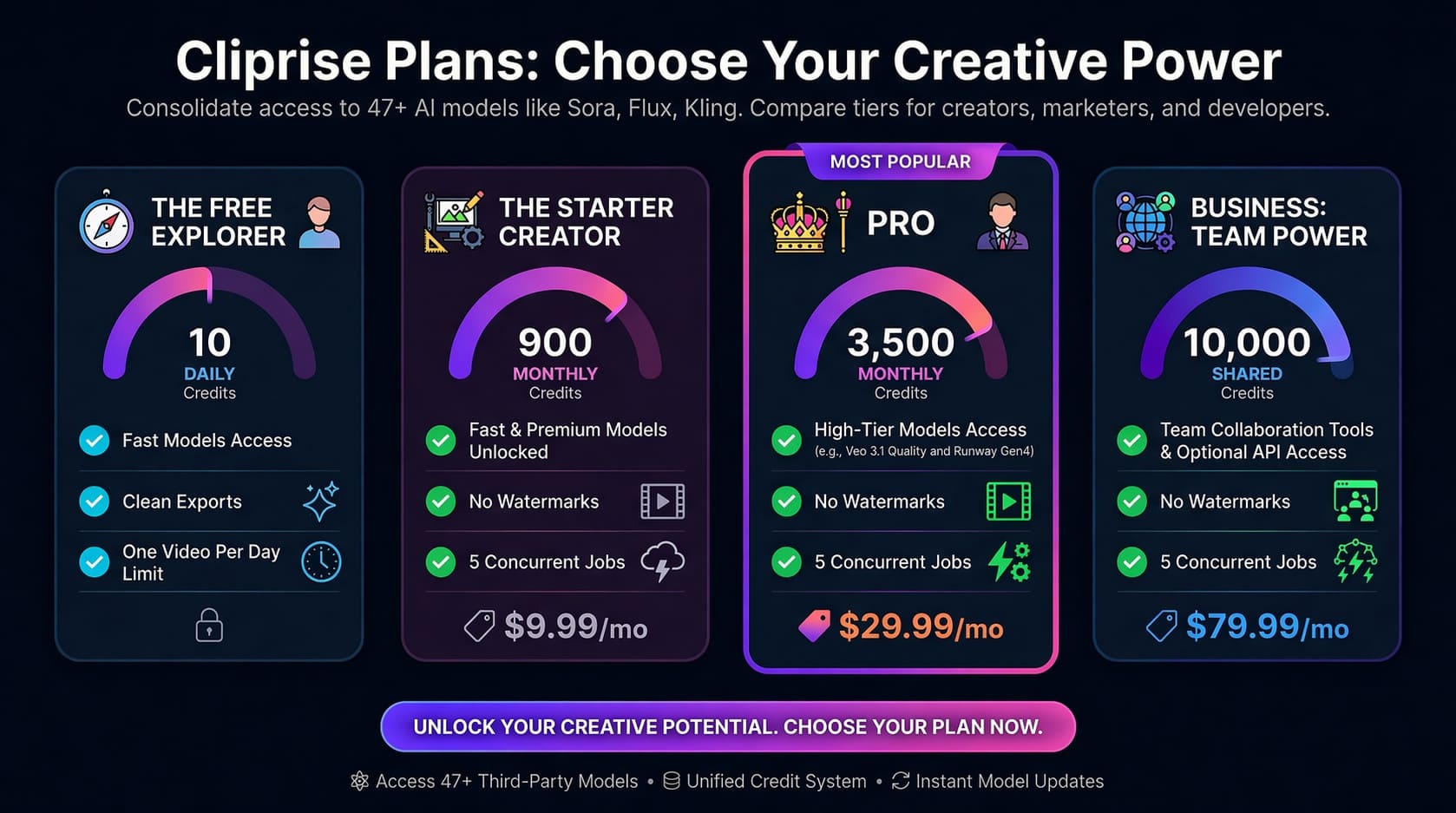
You receive 30 sign-up credits and then 10 daily credits on the standard starter cadence so you can compare models honestly. Premium throughput, team seats, and optional routes still follow the in-app catalogue.
- Match spend to storyboard length before you batch twenty variants.
- Escalate resolution only after motion paths feel stable at preview sizes.
Where image-to-video fits your growth stack
These patterns assume brand and legal already signed off on generated media.
Growth and lifecycle marketing
Spin iterative ads from identical stills while measurement teams compare hook rates rather than debating new photoshoot budgets every sprint.
Short-form storytelling
Move from deterministic hero art into motion-native formats without discarding continuity between thumbnail and landing page.
Credits scale with throughput
The infographic below mirrors the publicly posted pricing tiers. Numeric tables can change between deploys, treat it as illustrative and verify live numbers inside Cliprise billing.
FAQ: image-to-video AI on Cliprise
Short answers summarize policy. Executable detail always stays inside the authenticated app.
Animate the frame you trust
Bring the Cliprise workspace side by side with this page while you audition models.
Continue learning
Keep internal navigation tight for SEO clusters.
AI Video Generator
Bridge text-first and image-first briefs without leaving the same credit wallet.
Workflow guide
Step-by-step prep, queue etiquette, and export hygiene for teams.
AI Image Generator
Craft stills that survive downstream motion before you ever hit render on video.
Text-to-video model comparison
When the brief starts from language, not a locked still.
Chinese AI video models
Workflow analysis for HappyHorse, Seedance, Kling, and Wan.