Kling 3.0 vs Kling 2.6: What Changed and When to Upgrade
Quick takeaway
Choose Kling 3.0 if: Your pipeline requires 4K delivery, you need multi-shot edited sequences, integrated audio, or work with speed ramping in post-production.
Choose Kling 2.6 if: You deliver exclusively at 1080p for web and social, prioritize lower credit cost, have established 1080p workflows that work well, or single-shot 10s clips meet your needs.
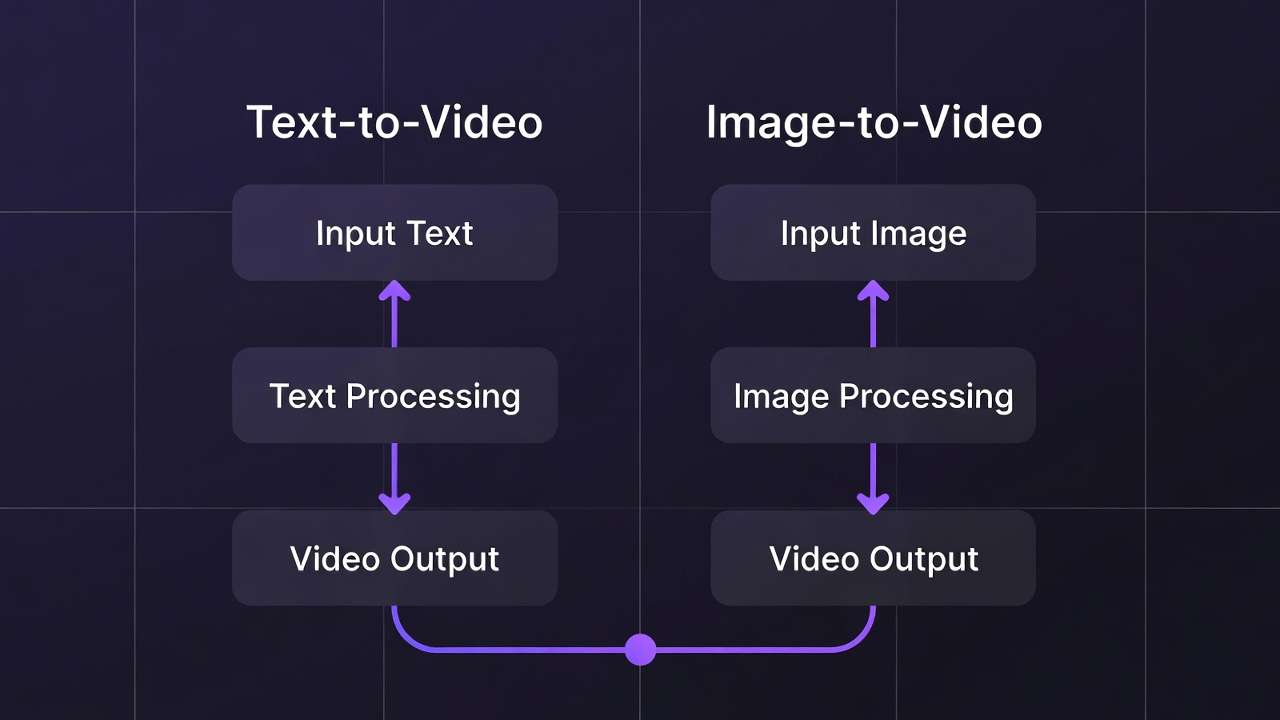
Kling 3.0 launched on February 4, 2026, as Kuaishou's generational upgrade from the Kling 2.x series. If you have been using Kling 2.6 in your workflows, the question for any ai video creator is not whether Kling 3.0 is better in the abstract - it is whether the specific improvements change your production outcomes enough to justify adjusting established workflows.
This comparison covers every meaningful difference between the two versions so you can make an informed decision about when to use each. Both Kling 3.0 and Kling 2.6 remain available on Cliprise through the AI Video Generator. You can test both directly inside the same interface.
Specification Comparison
| Specification | Kling 3.0 | Kling 2.6 |
|---|---|---|
| Max resolution | 4K native (3840x2160) | 1080p |
| Max duration | 15 seconds | 10 seconds |
| Frame rates | 24 / 30 / 60fps | 24 / 30fps |
| Multi-shot storyboard | Up to 6 cuts | No |
| Native audio | Yes - 5 languages, accent control | No |
| Character locking | Omni variant with reference upload | No |
| Temporal consistency | Improved DiT architecture | Good, some drift beyond 7s |
| Camera control | Strong - professional vocabulary | Good - standard operations |
| Quality tiers | Standard / Professional | Standard / Professional |
| Credit cost | Higher per generation | Lower per generation |
Testing Methodology
This comparison is based on testing both Kling versions on Cliprise. Duration tested: 5s, 10s (2.6); 5s, 10s, 15s (3.0). Resolution tested: 1080p for 2.6; 1080p and 4K native for 3.0. Prompt structure: Social media clips, product demos, narrative establishing shots. Generations compared: 25+ matched prompts across both versions.
Resolution: 1080p to Native 4K
The most straightforward upgrade. Kling 2.6 generates at 1080p maximum. Kling 3.0 generates natively at 4K (3840x2160) at up to 60fps.
This is native generation, not upscaling. The diffusion process resolves actual detail at the pixel level - fabric weave, skin pores, surface grain, environmental micro-texture. Kling 2.6 output upscaled to 4K through external tools introduces hallucinated detail and softened edges that native 4K avoids.
The 60fps option is entirely new. Kling 2.6 capped at 30fps. The higher frame rate enables slow-motion extraction and speed ramping by conforming 60fps output to 24fps in post-production - a technique borrowed from traditional production that was not possible in the 2.x series.
Upgrade impact: If your delivery pipeline requires 4K or you work with speed ramping in post-production, this is a substantial upgrade. If you deliver exclusively at 1080p for web and social, the resolution improvement exists but may not visibly affect your audience's experience.
Duration: 10 Seconds to 15 Seconds
Kling 2.6 generated up to 10 seconds per clip. Kling 3.0 extends to 15 seconds. The additional five seconds matter more than they might appear on paper, particularly when combined with the multi-shot storyboard feature.

A 15-second clip with six camera cuts can contain an establishing shot (0-3s), a mid-shot transition (3-6s), a close-up detail (6-9s), a reaction shot (9-12s), and a closing wide (12-15s). This is a complete edited sequence from a single generation. In Kling 2.6, this workflow required generating five separate clips, reviewing each for consistency, and assembling them manually.
Upgrade impact: For social media ads (15s is a standard ad unit), multi-shot product showcases, and any workflow where edited sequences are the deliverable, the combination of extended duration and storyboard capability is a fundamental workflow change, not an incremental improvement.
Multi-Shot Storyboard: Entirely New
This feature did not exist in any form in Kling 2.6. It is the single most significant production workflow change between the two versions.
Kling 3.0's storyboard system allows up to six distinct camera cuts within a single generation. Each cut has independently specified framing, camera movement, duration, and narrative content. All cuts share a unified latent space - character appearance, environmental lighting, spatial relationships, and object positions maintain consistency automatically across the cuts.
In Kling 2.6, achieving similar results required generating individual clips with carefully matched prompts, managing seeds for visual consistency, and assembling the sequence in editing. Results varied because each generation existed in its own latent space. Character identity could drift between clips. Lighting could shift. Environmental details might not match.
Upgrade impact: High for anyone producing edited sequences. The storyboard feature does not just save time - it produces more consistent multi-shot output because all cuts reference the same generation context.
Native Audio: Entirely New
Kling 2.6 generated video without audio. Dialogue, voiceover, ambient sound, and sound effects required separate tools and manual synchronization.
Kling 3.0 generates synchronized audio in the same pass as video. Supported capabilities include lip-sync dialogue in English, Chinese, Japanese, Korean, and Spanish with regional accent control. Multi-character scenes support dialogue attribution. Ambient sound and environmental audio generate alongside video output.
Upgrade impact: For dialogue-driven content, multilingual projects, and any workflow where audio-visual synchronization matters during generation (not just in post), this collapses what was previously a multi-tool pipeline into a single step. For projects where audio is always custom-produced in post-production, the feature is useful for prototyping but may not change the final pipeline.
Character Consistency: Omni Variant
Kling 2.6 had no reference-based character locking. Character consistency across clips depended entirely on prompt description consistency and seed management - functional but imprecise. Characters could drift in appearance between separate generations.
Kling 3.0's Video 3.0 Omni variant introduces character element locking through reference image upload. Provide 3-5 reference images (and optionally a voice sample), and the model extracts and locks visual traits - face structure, body proportions, clothing, posture - across subsequent generations. This is structural consistency, not prompt-dependent approximation.
Upgrade impact: For serialized content, advertising campaigns with recurring characters, brand mascot work, and any project requiring exact character identity across many clips, the Omni variant provides a reliability level that was not achievable in 2.6.
Temporal Consistency
Kling 2.6 produced good temporal consistency for clips under seven seconds. Beyond that threshold, secondary elements could begin drifting - subtle texture flickering, identity softening on background characters, and environmental detail inconsistency. The model allocated computational attention effectively for short clips but stretched at longer durations.
Kling 3.0's Diffusion Transformer architecture processes spatial and temporal dimensions simultaneously with a wider attention window. Each frame references surrounding frames in the sequence, maintaining consistency across the full 15-second generation window. Complex scenes with multiple moving elements still present challenges, but the threshold at which artifacts accumulate has moved meaningfully - from roughly seven seconds in 2.6 to approximately ten seconds in 3.0 for complex scenes, and full 15 seconds for simpler compositions.
Upgrade impact: For clips under seven seconds, the improvement is subtle. For clips from seven to fifteen seconds, the improvement is significant and directly visible in output quality.
Camera Control
Both versions respond to camera vocabulary, but Kling 3.0 demonstrates higher fidelity in differentiating between camera operations.
Kling 2.6 handled standard camera operations - dolly, pan, tilt, zoom - with reasonable accuracy. Complex specifications like lens character, parallax behavior, and combined operations (dolly forward while craning up) produced variable results.
Kling 3.0 differentiates between camera operations more precisely. "Slow dolly forward, 85mm lens, shallow depth of field" produces parallax shift, depth compression, and bokeh characteristics specific to that combination. Combined operations execute more reliably. Professional cinematography terminology translates more directly to output.
Upgrade impact: For creators who prompt with specific cinematographic vocabulary - focal length, depth of field, combined movements - the improvement is immediate and meaningful. For creators using simpler camera descriptions ("camera moves closer"), the difference is less pronounced.
Credit Cost Consideration
Kling 3.0 costs more per generation than Kling 2.6. This is expected given the expanded capabilities - 4K, 60fps, storyboard, audio - but the cost difference matters for high-volume workflows.
Kling 2.6 remains the more credit-efficient option for specific use cases where its capabilities are sufficient. Rapid iteration, concept testing, bulk social content at 1080p, and any workflow where 4K and audio are not requirements can benefit from Kling 2.6's lower per-generation cost.
The practical strategy: use Kling 2.6 for exploration and Kling 3.0 for final output. Validate concepts at lower cost, then upgrade to 3.0 for the generations that need the additional capability.
For current credit costs across all models, see pricing.
Decision Framework: Upgrade Immediately vs Wait
Quick takeaway
Upgrade immediately if: 4K briefs you can't fulfill, audio is part of deliverables, multi-shot or narrative sequencing is a regular pain point, or clients will expect 4K within 6 months.
You can wait if: 100% of work delivers at 1080p with no near-term 4K requirement, volume economics favor 2.6's credit cost, or you have a dialed-in 2.6 prompt library and want to avoid iteration overhead.
When to Stay with Kling 2.6
Kling 2.6 is not obsolete. These scenarios favor staying with the older version:
High-volume 1080p content. If you produce large quantities of short-form social content at 1080p where audio is added in post, Kling 2.6's lower credit cost per generation compounds into meaningful savings at scale.
Simple single-shot clips under 7 seconds. For straightforward clips within Kling 2.6's comfort zone, the output quality difference is minimal while the cost difference is real.
Rapid exploration and concept testing. When generating many variations to find a direction, Kling 2.6's lower cost makes exploratory iteration more affordable.
Established workflows. If your current pipeline is optimized around Kling 2.6's behavior and the output meets your quality requirements, the switching cost of adjusting prompts and expectations may not be justified for every project.
If you are generating at volume and adding audio in post, Kling 2.5 Turbo can be the better cost/performance option for 5-10 second clips. See: Kling 2.5 Turbo Complete Guide →.
When to Upgrade to Kling 3.0
4K or 60fps requirements. No alternative in the Kling family.
Multi-shot edited sequences. The storyboard feature fundamentally changes the workflow for producing edited content.
Dialogue or multilingual content. Native audio eliminates an entire pipeline step.
Character consistency across clips. The Omni variant provides reliability that prompt-based consistency in 2.6 cannot match.
Clips longer than 7 seconds. Temporal consistency improvements are most visible in the 7-15 second range.
Premium commercial work. When output quality directly impacts client satisfaction or brand perception, 3.0's improvements justify the higher credit cost.
For a deep technical breakdown of Kling 3.0's architecture and advanced workflows, see the Kling 3.0 complete guide. For advanced motion control techniques that apply to both versions, see the Kling 2.6 advanced guide.
Migration Tips: Moving from 2.6 to 3.0
What Carries Over
These elements transfer directly to Kling 3.0 without modification:
- F.O.R.M.S. prompting framework - Works identically on 3.0; no changes needed
- Negative prompt library - Transfer directly
- Image reference workflow - Same upload and reference logic
- Most prompt patterns - Patterns that worked on 2.6 typically work on 3.0
What to Recalibrate
Motion intensity settings. 3.0's Omni engine has slightly different motion dynamics than 2.6. Your 2.6 motion intensity settings may need minor adjustment to produce equivalent motion behavior on 3.0.
Audio workflow. If you were layering separate audio on 2.6 output, you can now test native 3.0 audio generation. For some use cases, native audio replaces the separate audio step. For precision sync to a specific external track, you may still prefer a dedicated audio tool (or Seedance 2.0's @Audio1 reference).
Resolution settings. Your 2.6 workflow used 1080p as the ceiling. With 3.0, test the same prompts at 4K before assuming 4K is always better - for draft and review workflows, 1080p at 3.0 is faster and sufficient.
Recommended Transition Workflow
- Run 5-10 of your most common brief types through Kling 3.0 using existing 2.6 prompts
- Compare outputs - identify what transferred well, what needs adjustment
- Document any prompt adjustments needed for 3.0's behavior
- Begin production on 3.0, keep 2.6 accessible via Cliprise for edge cases where it performs better on your specific briefs
Additional Adjustments
Prompt refinement. Kling 3.0 responds more precisely to camera vocabulary. Prompts that worked in 2.6 with general descriptions ("camera moves forward") may benefit from more specific language in 3.0 ("slow dolly forward, 50mm, medium depth of field").
Duration adjustment. Clips designed for 10-second maximum in 2.6 can now extend to 15 seconds. Review whether additional duration benefits the content rather than automatically generating at maximum length.
Storyboard planning. Multi-shot sequences that previously required 3-5 separate generations can now generate as a single storyboard. Restructure prompts from single-shot descriptions to multi-shot sequences with per-cut specifications.
Quality tier strategy. Use Standard mode for iteration (comparable in speed and cost to Kling 2.6), then switch to Professional for finals.
Frequently Asked Questions
Is Kling 2.6 being discontinued?
No. Kling 2.6 remains available on Cliprise alongside Kling 3.0. You can use both models in the same project, routing each shot to whichever version best fits its requirements.
Do my Kling 2.6 prompts work in Kling 3.0?
Yes. Existing prompts will generate in Kling 3.0 without modification. However, Kling 3.0 responds to more specific cinematographic vocabulary, so refining prompts to leverage the improved camera control can produce better results.
Can I mix Kling 2.6 and 3.0 clips in the same project?
Yes. Both models generate video in standard formats. Clips from either version can be assembled in any editing environment. Visual consistency depends on matching prompt descriptions, but both models share the same aesthetic lineage.
Is the credit cost difference significant?
For single generations, the difference is modest. For high-volume workflows producing hundreds of clips per month, the cumulative difference becomes meaningful. The hybrid strategy - 2.6 for iteration, 3.0 for finals - optimizes cost without sacrificing output quality.
Related Articles
- Best Kling AI Alternative 2026 →
- Kling 2.1: Complete Guide
- Kling 3.0 Tutorial: Step-by-Step Guide
- Kling 3.0 Complete Guide: Architecture, Prompting, and Production Workflows
- Kling 2.6 Advanced Guide: Motion Control and Physics Mastery
- Kling 3.0 Prompt Examples: 50 Production-Ready Prompts
- Kling 3.0 vs Sora 2: Complete AI Video Model Comparison
- Kling 3.0 vs Veo 3: AI Video Model Comparison
- Best AI Video Models on Cliprise 2026