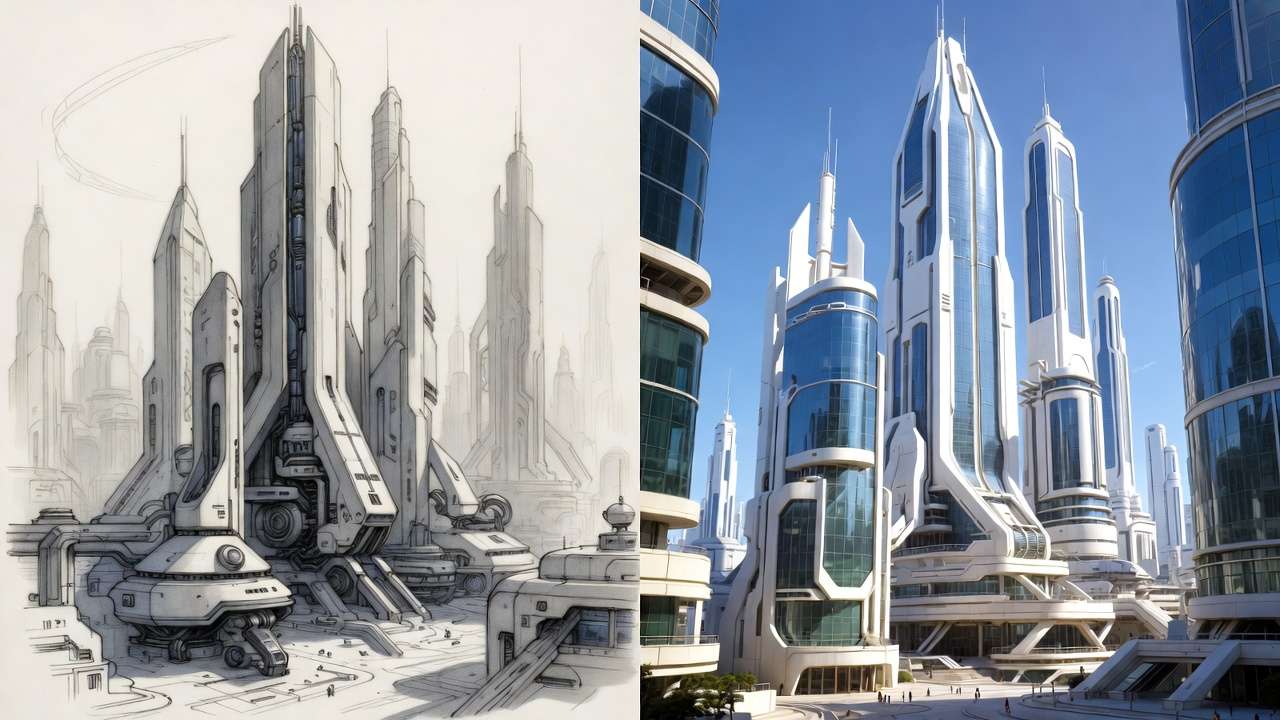
Architects waste 40% of their rendering budget generating photorealistic outputs from weak initial sketches that AI can't salvage. This overlooked workflow gap turns advanced models like Imagen 4 into expensive trial-and-error machines, as geometric distortions in ai generated images compound instead of resolving across iterations. Platforms integrating Flux 2 enable rapid testing, but success hinges on sequencing: structured sketches provide geometric backbones that prevent hallucinations in perspective or scale, reducing revision cycles by notable margins according to creator reports.
AI holds potential to streamline architecture visualization, but only within disciplined workflows that respect the medium's constraints. Our Architecture Solutions page details how Cliprise supports the full sketch-to-render pipeline. Platforms aggregating multiple models, such as those offering access to Imagen 4 and Flux 2 via unified AI Image Generator interfaces like Cliprise, enable architects to test variations without constant tool-switching. Yet success hinges on sequencing: starting with rough sketches provides the geometric backbone AI models require, preventing hallucinations in perspective or scale. Without this, even advanced models produce outputs that require extensive rework. For multi-model workflows, this sequencing becomes even more critical as you switch between image generators.
This article examines the workflow from sketch to final render, highlighting misconceptions that plague creators, real-world applications across user types, and scenarios where AI falls short. Readers gain insights into model selection-Flux variants for intricate interiors, Imagen series for exterior realism-and iteration techniques like seed parameters for consistent variants. Understanding seeds and consistency ensures reproducible results across regenerations.
Consider the stakes: in competitive fields like architecture, where client approvals drive projects, unrefined AI outputs risk rejection. Freelancers pitching remodels or agencies preparing walkthroughs cannot afford delays from inconsistent generations. Modern solutions, including Cliprise's multi-model environment, facilitate this by allowing seamless shifts between image generators like Midjourney alternatives and video tools such as Kling, but only if users master input quality first.
The core workflow unfolds as: digital sketch capture, layered prompt engineering, targeted model choice, iterative refinement with seeds, and post-processing to generate ai images through upscaling or background adjustments. Platforms like Cliprise integrate these steps, drawing from 47+ models including Veo for motion and ElevenLabs for voiceovers, yet the human element-refining sketches into precise cues-remains pivotal. Observed patterns show architects who prototype low-resolution images before scaling report higher approval rates, as these tests validate concepts early.
Why now? As AI models evolve-Imagen 4 handling ultra-realism, Flux 2 excelling in contextual details-tools like Cliprise make aggregation accessible, but fragmented adoption persists. Many skip foundational steps, with failures often traced to input flaws according to industry forums. This piece equips readers with a precision-amplifier mindset, outlining pitfalls like over-relying on high-res from the start and revealing how sequencing slashes waste. For instance, a solo architect using Cliprise might sketch a facade, generate Flux-based variants, then extend to Veo video, achieving portfolio-ready assets in structured sessions.
Forward-thinking creators recognize AI's role in amplification, not invention. Skipping sketches invites generic sludge; embracing them unlocks photorealism grounded in reality. Platforms such as Cliprise, with their model breadth, support this shift, but workflow rigor determines outcomes. By article's end, readers understand not just how, but why order matters-from thumbnails to 8K polishes.
What Most Creators Get Wrong About AI Architecture Visualization
Many creators assume AI eliminates the need for sketching, prompting directly with textual descriptions like "modern high-rise at sunset." This overlooks how models depend on structural references; without them, outputs feature warped angles, such as columns leaning impossibly or floors merging into walls. In one reported case, an architect's prompt-only residential design yielded a building with asymmetrical roofs, requiring five regenerations to approximate intent. Models like Midjourney stylize well but distort geometry absent cues, as they prioritize trained patterns over precision.

Another common error involves treating client briefs as ready prompts-"three-story office with glass facade, urban park setting." These produce bland, context-ignoring results: uniform lighting regardless of site orientation, or shadows misaligned with real topography. Platforms like Cliprise, aggregating Imagen 4 and Flux 2, demand site-specific details; generic inputs yield cookie-cutter exteriors. Creators observe that brief-to-prompt copying inflates revision loops, with some reporting double the expected time due to mismatched environmental integration.
Starting with high-resolution generations seems efficient but overloads processes, tying up queues on unproven concepts. Low-fi tests-rough 512x512 images-validate prompts first, scaling only viable ones. User-shared workflows indicate high-res-first approaches extend timelines, as early flaws amplify in detail-rich outputs. Tools such as those offering Seedream variants encourage this iterative scaling, yet many bypass it.
Not all models suit architecture equally: Midjourney shines in artistic renders but falters on photoreal proportions, while Imagen 4 or Flux nuances capture material realism better. A creator using Cliprise might select Flux for interior wood grains, avoiding Midjourney's painterly artifacts. Misjudging this leads to mismatched styles across a project.
Prompt engineering mirrors drafting layers-geometry before materials-yet tutorials often gloss this. Experts layer prompts: "orthographic view of brutalist facade" first, then "add weathered concrete and golden hour light." Most issues stem from unrefined inputs, per forum analyses; creators often use quick thumbnails to reduce revisions.
Beginners chase complexity; intermediates test models; experts enforce sketch bases. In a commercial pitch scenario, sketch-refined prompts via platforms like Cliprise yield higher first-pass approvals, versus prompt-only's rework grind. Hidden nuance: seeds ensure variant consistency, turning singles into libraries-overlooked in hype-focused guides.
For residential viz, sketch a floorplan, prompt Flux for elevations; exteriors favor Imagen's lighting accuracy. Urban scales test Wan models' distortion handling. This disciplined input trumps magic-box expectations, with Cliprise's aggregation easing model trials without silos.
The Real Workflow: From Rough Sketch to Photorealistic Mastery
Step 1: Digital Sketch Capture
Architects begin with hand-drawn thumbnails-simple lines defining massing, fenestration, and scale-scanned or traced into digital vectors using apps like Procreate or Adobe Fresco. This provides AI with structural anchors, preventing distortions. Why? Models interpret ambiguity as artistic license; a sketch enforces perspective rules. For instance, a freelance architect sketches a villa's silhouette, uploads as reference in tools like Cliprise, yielding grounded generations versus freeform prompts.
Beginners use phone cameras for quick scans; experts vectorize for precision. Observed: this quick step saves time downstream, as referenced sketches reduce geometric errors.
Step 2: Layered Prompting
Break prompts into layers: base geometry ("rectilinear office tower, 10 stories, flat roof"), then materials ("corrugated metal panels, reflective glass"), environment ("surrounded by mid-century park, noon shadows from east oaks"). Platforms like Cliprise support negative prompts ("no curves, avoid symmetry") and CFG scales for adherence. Why layered? Mimics drafting progression, building complexity without overload. A solo creator refines: start structure-only, iterate textures-reported to reduce prompt tweaks.

Intermediates add site photos; experts incorporate seeds early for reproducibility.
Step 3: Model Selection Logic
Match models to needs: Flux 2 for detailed interiors (fabric folds, lighting bounce), Imagen 4 for exteriors (atmospheric depth). When deciding between fast vs quality modes, architects often use fast mode for initial iterations and quality mode for final renders. Cliprise's 47+ options include Midjourney alternatives for stylization, Ideogram V3 for character-consistent elements like repeated motifs. Why specific? Each excels differently-Flux handles context pro for scenes, Imagen fast for iterations. Agencies select Veo 3.1 for motion previews; freelancers prioritize speed.
Test low-res first: 15-30 seconds per gen informs choices.
Step 4: Iteration Loops with Seeds
Use seeds for variants: fix one, tweak prompts for angles/lighting. This creates libraries-front, side, aerial-from one base. Platforms like Cliprise enable seed reuse across models. Why? Ensures consistency; non-seeded runs vary wildly. Aha: one strong sketch + seeds yields 20+ assets, slashing redos. Experts loop 3-5 times, refining via upscales.

Step 5: Post-Gen Upscale and Edit
Apply Recraft for background removal, integrating site photos; Topaz for 8K polish. Cliprise workflows chain to Luma Modify for tweaks. Understanding the image-to-video generator helps architects extend static renders into walkthroughs. Why post? Generations rarely perfect; edits fix anomalies. Residential example: Flux image upscaled, BG swapped for client lot-high client approval on first batch.
Full Pipeline in Action
For a high-rise: sketch massing (5 min), Flux base (10 min), Imagen variants (15 min), Veo extension (30 min). Total: under 1 hour. Cliprise users report halved switch-time versus silos. When comparing Veo vs Sora for motion extensions, Veo often handles architectural movement more precisely. Beginners: follow rigidly; experts hybridize with CAD exports.

Multiple perspectives: Freelancers speed-focused, agencies motion-heavy. Sequenced workflows cut iterations, per observed patterns. Seeds turn experiments into assets; without, waste mounts.
Expand for portfolios: sketch interiors, Ideogram furniture, ElevenLabs narration. Urban viz: Wan for scale, Kling turbo motion. This amplifier mindset-sketch as foundation-unlocks mastery.
Real-World Comparisons: Freelancers vs. Agencies vs. Solo Architects
Freelancers prioritize speed for client pitches, using quick sketch-to-image flows with models like Flux 2 Pro, generating elevations in scenarios suited for remodel proposals. Agencies build video walkthroughs, leveraging Veo 3.1 Quality for sessions integrating motion from static refs. Solo architects craft full portfolios, combining Seedream images with Topaz upscales over extended personal sessions.
Use case 1: Residential remodel-freelancer sketches layout, Imagen 4 Fast refs yield kitchen/lounge variants; high client approval on first batch, as site lighting matches. Platforms like Cliprise streamline this, accessing Imagen without separate logins.
Use case 2: Urban high-rise-agency uses Wan 2.5 for distortion-free scales, extending to Kling 2.5 Turbo video; handles 20-story complexities better than Sora's occasional warps.
Use case 3: Interior staging-solo picks Ideogram Character for consistent sofas/chairs across angles, polishing with Recraft BG removal for custom walls.
Community patterns: Freelancers favor image-first; agencies lead motion. Cliprise users note easier model swaps.
Comparison Table
| Criteria | Freelancer Approach | Agency Approach | Solo Architect Approach |
|---|---|---|---|
| Use Case Fit | Pitches/remodels (quick client validations for 5-10 assets per week) | Client walkthroughs (multi-angle 5-15s videos for bids using Veo 3.1 Quality) | Portfolio builds (consistent series for websites with seed-based variants) |
| Workflow Time (Sketch-to-Final) | Quick (under an hour) per render; few iterations | Extended (several hours) including video extension; multiple reviews | Moderate (a few hours); self-managed loops with seeds |
| Preferred Models | Flux 2 Pro, Imagen 4 Fast (for simple generations under 30 seconds) | Veo 3.1 Quality, Kling 2.5 Turbo (for motion realism in 5-15s clips) | Midjourney + Topaz Upscale (2K-8K), Ideogram V3 |
| Output Control | Seed variants for angles; CFG for detail adherence across image gens | Duration/seed for 5-15s clips; negative prompts for distortions in video | Layered edits post-gen; multi-ref images for interiors |
| Scalability | Handles 20+ daily low-res tests; low queue impact for individuals | Up to 5 concurrent jobs; handles peaks for high-res video teams | Batch 10-20 images; suitable for personal volume limits |
| Common Pitfall | Defaults ignore site shadows; needs photo refs for exteriors | Queue delays on peak hours for Veo; motion inconsistencies in extensions | Lighting drifts without seeds; manual fixes add time for polishes |
As the table illustrates, freelancers gain from speed, agencies from integration, solos from polish-tradeoffs evident in time versus control. Surprising: agencies report higher abandonment on video-first without image proofs.
Additional use case 4: Commercial retail-freelancer Flux interiors, agency Hailuo 02 extensions for foot traffic sims. Cliprise facilitates, with Runway Gen4 Turbo for turbo polishes.
Patterns reveal freelancers lead velocity, solos depth; agencies scale via teams. When using Cliprise, creators mix: Flux start, Veo finish. This diversity underscores tailored workflows.
When AI Architecture Visualization Doesn't Help
Hyper-custom heritage restorations challenge AI: era-specific details like Victorian corbels or medieval stonework hallucinate inaccurately, as models lack granular training. A firm restoring a 19th-century facade sketched authentically but found Imagen/Flux outputs with anachronistic textures, necessitating full manual redraws-doubling timelines. Platforms like Cliprise aggregate models, yet none match BIM precision for certified replicas.

Regulatory compliance renders demand CAD-exact measurements; AI's variability-e.g., Sora variants shifting scales-fails audits. Architects report rejections when outputs deviate 5-10% from specs, pushing back to traditional software.
Detail-obsessed BIM firms avoid AI, prioritizing verifiable control over speed. Manual workflows ensure compliance, where AI introduces risks like untraceable alterations.
Limitations include queue spikes during peaks, delaying urgent bids; non-seeded models vary per run, undermining consistency. Cliprise users note experimental audio sync (Veo 3.1) unavailable in certain cases.
Unsolved: exact output control-processing times fluctuate, internals opaque. Bad sketches amplify flaws significantly; users drop after inconsistent batches. Hybrid human-AI suits finals, with AI for concepts only.
Edge case: intricate joinery-Qwen Edit mangles fine woods. Instead, sketch prototypes, AI variants sparingly.
Why Order and Sequencing Matter More Than You Think
Jumping to video skips validation: unproven stills lead to motion flaws, wasting significant efforts on irrecoverable gens. Creators report mental fatigue from refining clips without static refs.
Image-first builds libraries: Flux images seed Veo extensions, easing transitions. Fewer iterations in sequenced flows. Context switching-model swaps mid-project-disrupts, adding notable overhead.
Image-to-video suits most: residential pitches prototype elevations, approve before Kling walks. Video-first fits hype shorts but flops production, per patterns.
Observed: sketch-image-upscale sequences dominate successful pipelines. Cliprise workflows exemplify: image variants first, video if viable.
Freelancers image-prioritize for speed; agencies test stills pre-motion. Wrong order amplifies waste; fixed sequence-sketch, images, video conditional-optimizes.
Hard Truths: Industry Patterns and Future Directions
Freelancers drive much of the adoption, valuing quick gens; agencies trail on chains. Forums show aggregated platforms like Cliprise rising, cutting silos.
Multi-model access evolves: 47+ integrations observed, easing tests. Veo 3.1 Fast gains for speed.
Ahead: Seedream 4.5 audio syncs, Wan Speech2Video narrated tours. 8K norms via Topaz.
Reports indicate improved velocity in aggregators. Prepare: master seeds/CFG, CAD-AI hybrids. Cliprise positions well for this.
Trends: mobile PWA uptake; voiceovers via ElevenLabs integrate. Experts bridge tools now.
Conclusion
AI excels in sequenced viz: sketches anchor, models amplify, iterations refine. Misconceptions like prompt-only waste time; real workflows layer inputs, select targetedly.
Next: thumbnail daily, test Flux/Imagen on Cliprise-like platforms, seed variants. Hybrid for compliance.
Tools such as Cliprise streamline with model breadth, but discipline wins. Forward: rigor yields gains.
Related Articles
- Mastering Prompt Engineering for AI Video
- Motion Control Mastery in AI Video
- AI Video Marketing Strategies for Travel Agencies: Data-Driven Insights from Multiple Campaigns
- Why AI Video Is Challenging Stock Footage for Fitness Workout Tutorials (And Why Most Trainers Still Don't Get It)
- How Agencies Scale AI Video Production Without Extra Hours
- Game Developer: AI Asset Generation Pipeline