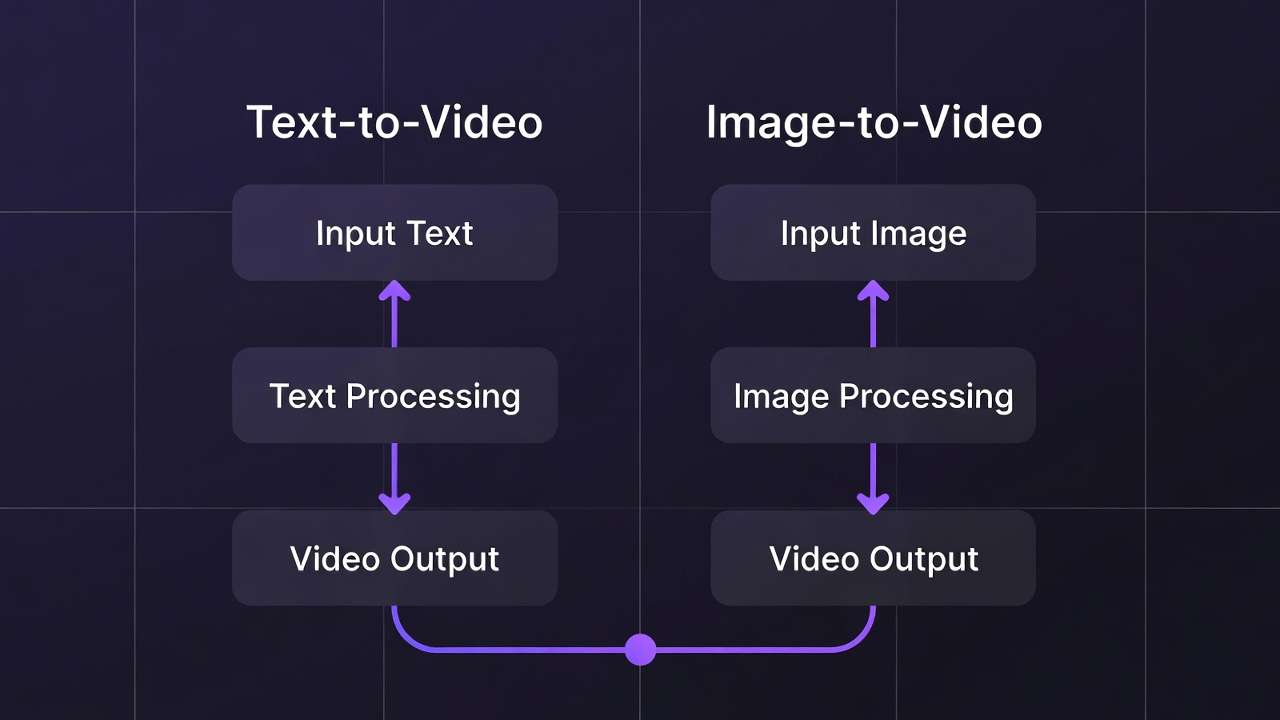
Text-to-video generation via an AI Video Generator promises limitless creation from words alone. Image-to-video workflows often deliver superior fidelity by leveraging existing visuals as creative anchors. This fundamental trade-off shapes every video production decision in multi-model platforms-revealing when each approach excels strategically.
Both workflows share core controls: text prompts, aspect ratios, duration settings (5s/10s/15s options), seed values for reproducibility, negative prompts, CFG scale adjustments. The critical difference lies in input requirements and resulting quality characteristics. Understanding this distinction optimizes credit allocation, accelerates iteration cycles, and improves final output quality measurably. If you are deciding between a Google-forward cinematic stack and ByteDance multimodal references inside one text-led job, Seedance 2.0 vs Veo 3.1 maps the fork without hand-waving.
This text to video ai comparison evaluates model options, workflow patterns, and practical applications to help creators align production strategies with project requirements efficiently.
Text-to-Video Generation Workflows
Text-to-video enables complete video creation from descriptive prompts alone, without requiring visual inputs. Models like Veo 3 variants, Sora 2, Kling 2.5 Turbo, Wan 2.5, Hailuo 02, Runway Gen4 Turbo, and ByteDance Omni Human process textual scene descriptions directly into motion sequences.

Users craft descriptive prompts detailing scenes, actions, or transitions: "City skyline transitions from day to night as flying cars navigate between buildings, cinematic lighting, 10 seconds." Then adjust aspect ratio, duration, seed values, negative prompts ("no blur, no distortion"), and CFG scales. These parameters enable fine-tuning without visual references.
Model Specialization Patterns
Different text-to-video models excel at distinct creative challenges. Veo series prioritizes environmental detail and atmospheric lighting. Sora 2 handles narrative sequencing and emotional pacing naturally. Kling variants optimize for rapid prototyping velocity. Wan models scale resolution options efficiently. Hailuo emphasizes professional motion dynamics. Runway accelerates processing times. Omni Human focuses specifically on realistic human figure generation.
Applications and Strengths
Text-to-video thrives for conceptual exploration without existing assets: promotional video prototypes, abstract visual content, initial storyboard development. Marketers prototype advertisement concepts rapidly. Animators sketch narrative keyframes. Concept artists explore motion ideas freely.
Prompt enhancement tools refine inputs pre-generation for optimal model interpretation. Progress tracking through status systems with async notifications maintains workflow visibility. Processing queues vary by model and tier priority.
Workflow Advantages
Speed to first draft: No image sourcing or preparation required. Creative flexibility: Explore concepts unconstrained by existing visual assets. Ideal for: Pure ideation, abstract content, rapid concept testing.
Limitations
Peak-hour queue congestion impacts turnaround times significantly. Model output variability without seeds creates inconsistency across regenerations. Credit scaling favors lighter testing models over premium quality engines. Free tier daily resets support experimentation but production demands paid capacity expansion.
Image-to-Video Generation Workflows
Image-to-video transforms static visuals into animated sequences, emphasizing reference-anchored animation and targeted refinement. Models like Runway Aleph, Luma Modify, and Topaz Video Upscaler process uploaded images plus motion prompts for controlled animation outcomes.
Workflow demands uploaded image plus descriptive motion prompt: "Animate flowing water and wind-swept trees across this landscape scene." Controls mirror text-to-video-aspect ratios, duration, seed support where available-but visual reference constrains and guides motion generation fundamentally.
Model Specialization Patterns
Runway Aleph extends scenes cinematically and manipulates specific objects within frames. Luma Modify applies targeted visual effects and background transformations. Topaz upscales lower-resolution source material to production quality systematically. Complementary preprocessing includes AI background removal before animation.
Applications and Strengths
Image-to-video leverages existing visual assets strategically: product photography transformed into demonstration videos, character designs animated into motion sequences, image-generated stills extended into dynamic presentations.
Style consistency preservation becomes primary advantage. Brand visual identities maintain fidelity through animation. Logo presentations animate predictably. Product showcase videos preserve exact asset appearance reliably.
Workflow Advantages
Reference-locked consistency: Visual style anchored by source image. Reduced prompt ambiguity: Image establishes composition, prompt focuses motion only. Asset reusability: Existing photography/design investments extend value. Ideal for: Brand content, product demos, asset animation.
Limitations
Fewer dedicated models versus text-to-video options. Input image quality directly impacts output potential-poor source material limits achievable results. Partial seed support reduces repeatability compared to leading text-to-video engines. Image preparation adds workflow step before generation begins.
Direct Comparison Analysis
| Aspect | Text-to-Video | Image-to-Video | Strategic Implication |
|---|---|---|---|
| Input Requirements | Text prompt only | Image + text prompt | Image-to-video requires preparation step |
| Model Options | 10+ core models + variants | 3 core models + complements | Text-to-video offers broader selection |
| Creative Freedom | Unlimited conceptual range | Constrained by source image | Text-to-video suits pure ideation |
| Style Consistency | Variable, prompt-dependent | Anchored by reference image | Image-to-video preserves brand identity better |
| Iteration Speed | Fast initial generation | Preprocessing adds time | Text-to-video faster for first draft |
| Output Predictability | Higher variance | Reference reduces surprises | Image-to-video more controlled |
| Credit Efficiency | Model-dependent | Similar cost structure | Workflow chaining optimizes both |
Strategic Workflow Selection
Choose Text-to-Video When:
- Exploring conceptual directions without existing assets
- Prototyping advertisement narratives rapidly
- Creating abstract visual content
- Testing creative ideas before detailed production
- Budget constrains asset photography/design
Choose Image-to-Video When:
- Preserving specific brand visual identities
- Animating existing product photography
- Extending designed character assets into motion
- Maintaining exact color palettes and compositions
- Reusing photography investments strategically
Hybrid Workflow Pattern: Text-to-video for ideation → Select best concepts → Refine as high-quality images → Image-to-video for final polish. This combines creative exploration with controlled execution efficiently.
Practical Implementation Examples
Product Launch Campaign: Generate conceptual video ideas via text-to-video (Sora 2 for narrative testing). Select strongest concepts. Create polished product images via Flux 2. Animate final images via Runway Aleph for brand-consistent showcase videos.
Social Media Content Series: Text-to-video via Kling 2.5 Turbo for rapid daily content volume. Image-to-video via Luma Modify for hero posts requiring exact brand color matching and logo integration.
Tutorial Content Production: Image-to-video workflow maintains interface consistency across tutorial series. Screenshot actual product interfaces. Animate with controlled highlighting and transitions via specific motion prompts.
Credit and Resource Optimization
Both workflows share unified credit systems with model-dependent consumption rates. Test concepts with lighter credit models (Kling variants for text-to-video, basic upscaling for image-to-video). Reserve premium model credits (Veo Quality, advanced Runway features) for validated final production.
Queue management strategies differ: Text-to-video benefits from parallel concept generation across multiple models. Image-to-video optimizes through careful image preparation reducing regeneration needs.
Free tier limitations (30 signup credits once, then 10 daily credits, plus one included video per day where applicable) suit text-to-video experimentation better. Paid tiers unlock image-to-video production workflows requiring iterative refinement cycles.
Technical Considerations
Seed Reproducibility: Strong in text-to-video models like Veo 3 and Sora 2. Variable in image-to-video workflows-source image anchors consistency partially but motion remains probabilistic.
Audio Synchronization: Experimental in both workflows. Veo 3.1 demonstrates ~95% success rates. Both benefit from separate audio layer addition post-generation via voice synthesis tools.
Multi-Image References: Partial implementation in select text-to-video models. Not standard in image-to-video workflows currently-limits complex scene consistency requirements.
Quality Optimization Strategies
For Text-to-Video: Invest prompt engineering effort in scene description clarity. Use seed controls systematically. Test across multiple models for prompt-model fit. Reserve credits for best-performing combinations.
For Image-to-Video: Optimize source images first (resolution, composition, clarity). Use negative prompts to constrain unwanted motion. Apply targeted motion descriptions rather than complex narratives. Pre-process with background removal when needed.
Both workflows benefit from combining multiple AI models: unified interfaces reduce context switching, shared credit pools enable flexible allocation, integrated enhancement tools streamline post-production.
Production Decision Framework
Evaluate projects systematically: Asset availability (existing visuals favor image-to-video), Creative constraints (brand guidelines favor image-to-video), Timeline pressure (text-to-video faster to first output), Budget (image preparation costs versus generation credits), Quality requirements (image-to-video delivers tighter control).
Related Articles
- AI Video Generator: Complete Guide 2026 →
- Biggest AI Video Mistake
- One Image Multiple Videos
- Image-to-Video Workflow Complete Cliprise Guide
- AI video model selection guide
- Seeds and Consistency Guide
- Kling AI Alternative 2026 → Most professional workflows ultimately combine both strategically-text-to-video for ideation velocity, image-to-video for production precision. Master both to build complete video production capabilities that optimize for speed, quality, and creative flexibility simultaneously.