Learn with Cliprise

Master cinematic AI creation with in-depth guides for prompting, composition, models, and creative workflows.

Quick Start Guide

Your First 5 Minutes with Cliprise

From sign-up to first AI creation in under 2 minutes. Follow this simple 5-step guide to start generating professional AI content immediately.
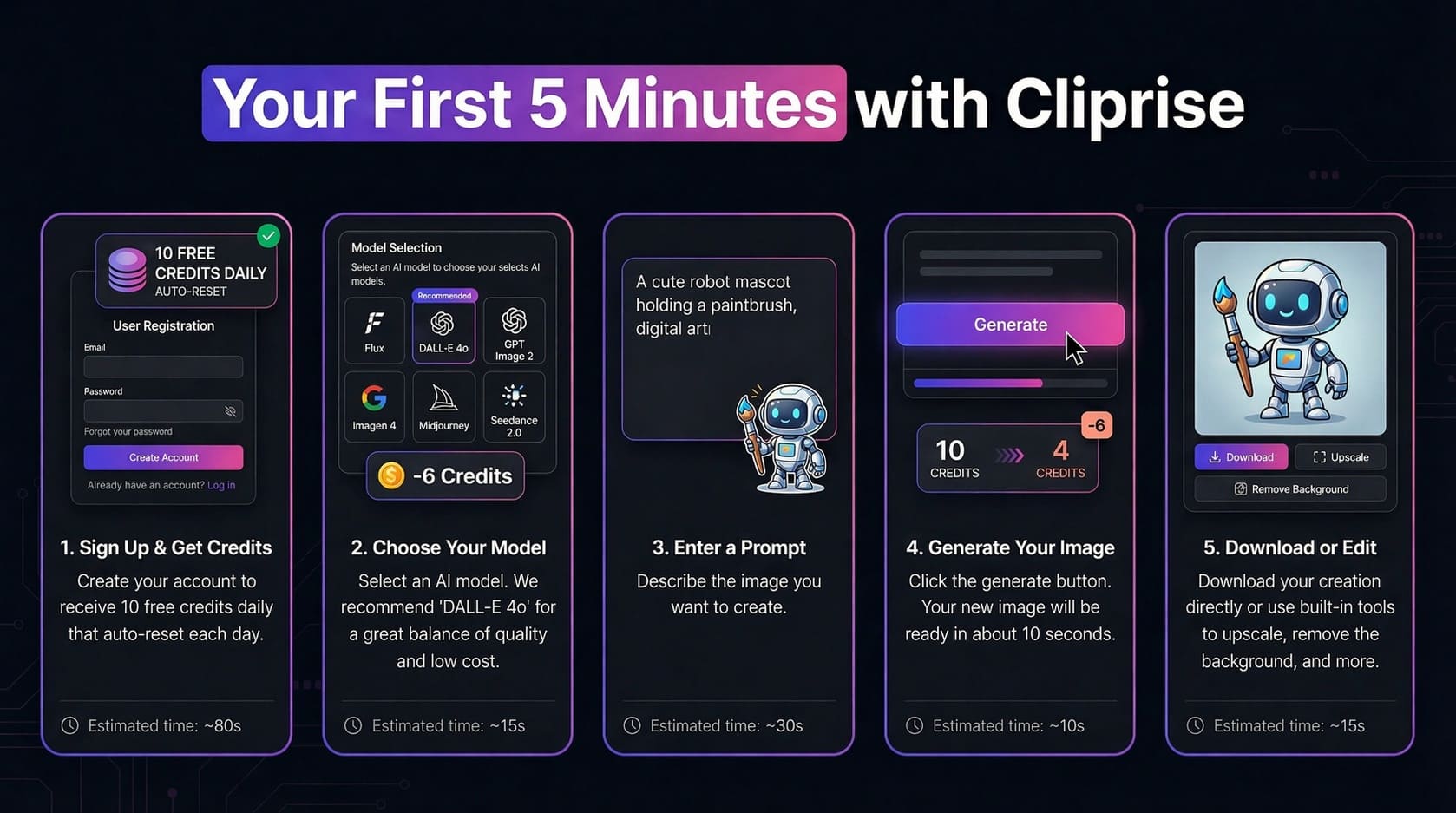
1

Sign Up

~80s

Create account — 30 signup credits once, then 10/day

2

Choose Model

~15s

Select AI model (DALL-E 4o recommended)

3

Enter Prompt

~30s

Describe what you want to create

4

Generate

~10s

Click generate and wait for magic

5

Download

~15s

Download or edit with built-in tools

Ready to Create Your First AI Image?

Sign up now and get 30 credits when you join (one-time), then 10 free credits per day to test fast models. No credit card required, start creating in minutes.

⏱️ Estimated time to first creation: Under 2 minutes

How Creators Use Cliprise: Real Workflows

See complete step-by-step workflows for common use cases. Each workflow includes process breakdown and estimated credit costs for budget planning.
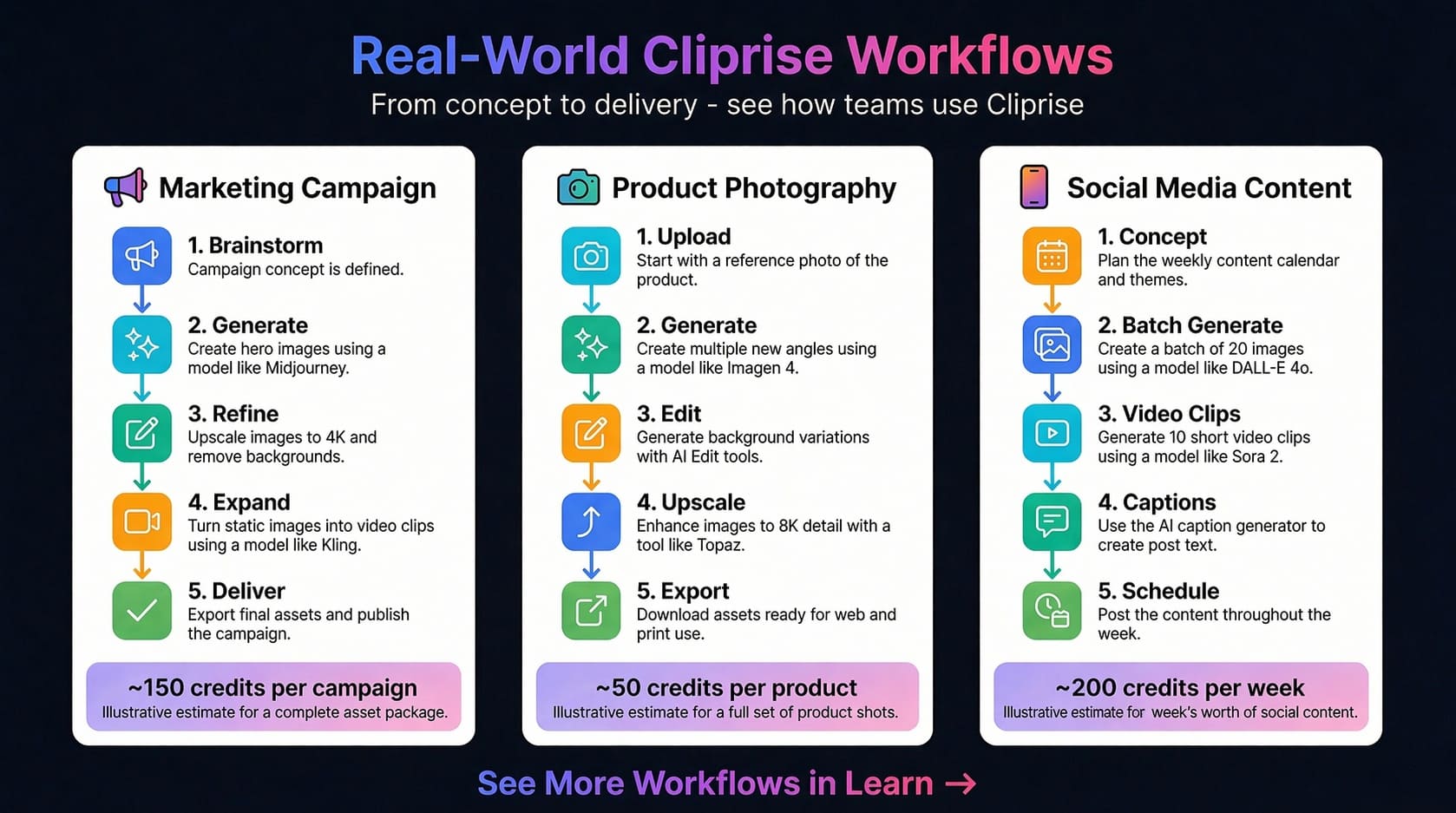
Marketing Campaign

≈150 credits per campaign

  1. 1.

    Brainstorm

    Define campaign concept & messaging

  2. 2.

    Generate

    Create hero images with Midjourney (15cr each)

  3. 3.

    Refine

    Upscale to 4K & remove backgrounds (19-37cr)

  4. 4.

    Expand

    Turn images into video clips with Kling (46-91cr)

  5. 5.

    Deliver

    Export final assets for web & print

Best Plan: Starter (900cr) = 6 campaigns/month

Pro Tip: Batch generate variations to find winners fast

Product Photography

≈50 credits per product

  1. 1.

    Upload

    Start with reference photo of product

  2. 2.

    Generate

    Create multiple angles using Imagen 4

  3. 3.

    Edit

    Generate background variations with AI tools

  4. 4.

    Upscale

    Enhance to 8K detail with Topaz (19-73cr)

  5. 5.

    Export

    Download assets for web & e-commerce

Best Plan: Pro (3,500cr) = 70 products/month

Pro Tip: Use Imagen 4 Standard for cost efficiency

Social Media Content

≈200 credits/week

  1. 1.

    Concept

    Plan content calendar & themes

  2. 2.

    Batch Generate

    Create 20 images with DALL-E 4o (120cr total)

  3. 3.

    Video Clips

    Generate 10 short clips with Sora 2 (11-15cr each)

  4. 4.

    Captions

    Use AI caption generator for post text

  5. 5.

    Schedule

    Post content throughout the week

Best Plan: Starter (900cr) = 4 weeks content

Pro Tip: Use fast models for high volume posting

Mobile Apps

Create AI Content On The Go

Professional AI image and video generation in your pocket. Learn how to master Cliprise mobile apps for iOS and Android.

Video Tutorials

Learn with Video

Watch comprehensive tutorials to master Cliprise AI in minutes

Tutorial
1:34

Cliprise Quick Tour - How to Generate AI Images & Videos in Seconds

A rapid 90-second tour of the Cliprise app, covering model selection, prompt-based generation, and the credit system.

Walkthrough
5:47

How Cliprise Works Behind the Scenes - Clara's AI Art Story

A story-driven walkthrough following a creator named Clara to demonstrate how to select models and use the token system effectively.

Educational Guide

Understanding the Credit System

Master how credits work in Cliprise. Learn about sources, renewal rules, generation costs, and how to maximize your monthly allocation.
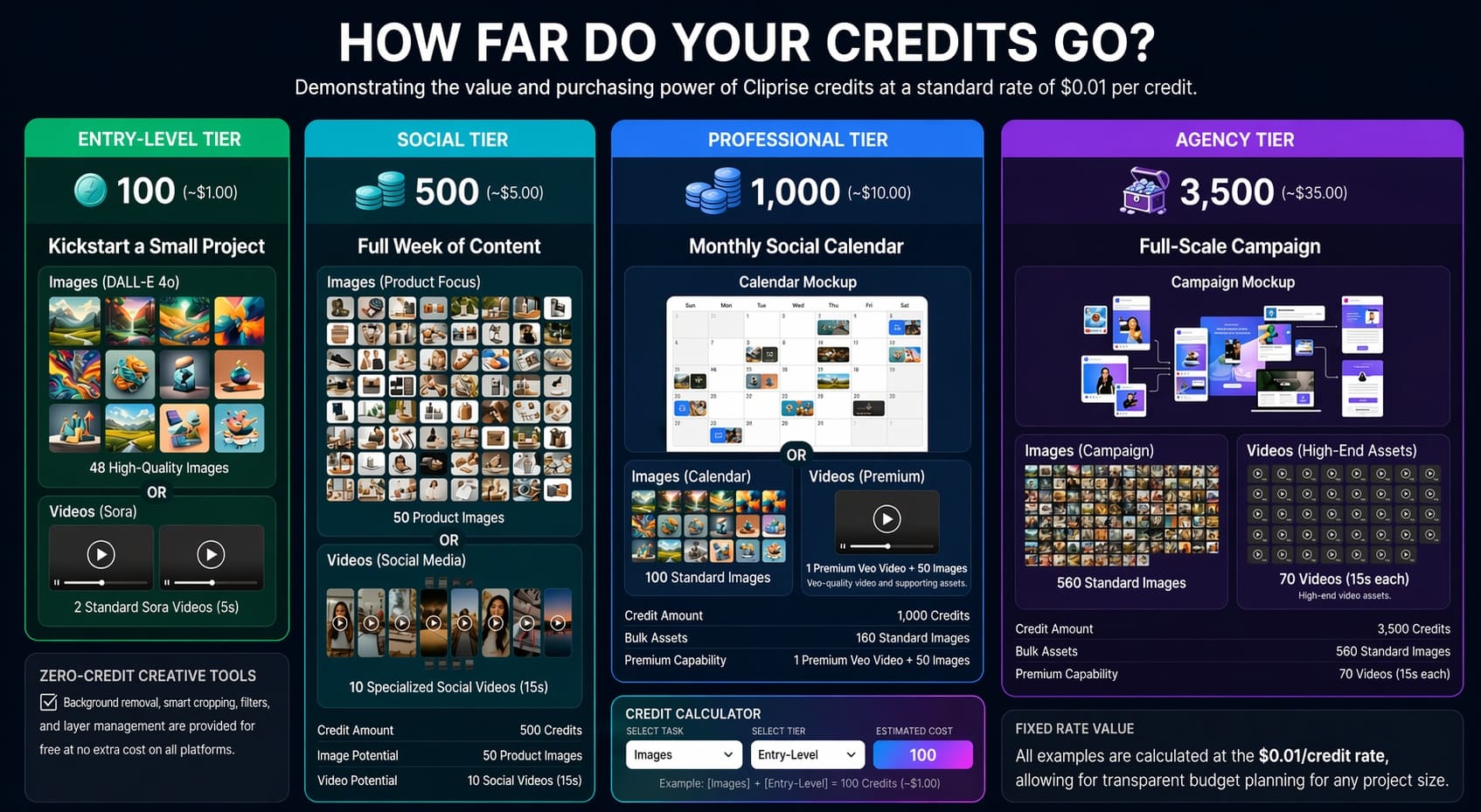
Credit Sources

  • Subscription: Monthly credits from your plan
  • Top-Ups: Purchase anytime; remain until used while your account is active
  • Daily Free: 30 credits on signup (one-time), then 10/day on Free plan

Credit Availability

  • Daily free: Reset every 24 hours on the Free plan
  • Subscription: Refresh with each billing cycle
  • Boosters: Remain available while your account is active

Check your in-app wallet for your current balance and applicable availability.

Key Rules

  • Top-ups stay until used; monthly plan credits refresh (no rollover)
  • Automatic refunds if generation fails
  • Unified balance for all media types

Typical Generation Costs

2-44

Image Generation

  • • Z Image: 2 credits
  • • DALL-E 4o / GPT Image 1: 11 credits
  • • Imagen V4: 8-22 credits (tiered)
  • • Flux 2 / Kontext: 9-44 credits
  • • Seedream / Nano Banana: tiered
18-1134+

Video Generation

  • • Sora 2: 54-63 credits (10-15s tiers)
  • • Kling 2.5 Turbo: 76-152 credits
  • • Veo 3.1 Lite: 60 credits / video
  • • Veo 3.1 Fast: 120 credits / video
  • • Veo 3.1 Quality: 500 credits / video
1-49

Audio & Voice

  • • ElevenLabs TTS: 49 cr / 5K chars
  • • Speech-to-Text: 7 cr / second of audio
  • • Sound FX / Isolation: 1 cr / audio
  • • V3 Dialogue: 1 cr / 5K chars

Pro Tip: Platform shows exact cost before you generate. Plan your monthly budget by estimating how many creations you need.

Credit costs can change when providers update rates. The in-app pricing screen always shows the exact credit cost before you generate. For reference tables, see Pricing or pricing.json.

Experiment Freely with AI

Don't fear mistakes - AI thrives on experimentation. Learn how to iterate, explore, and discover amazing results.
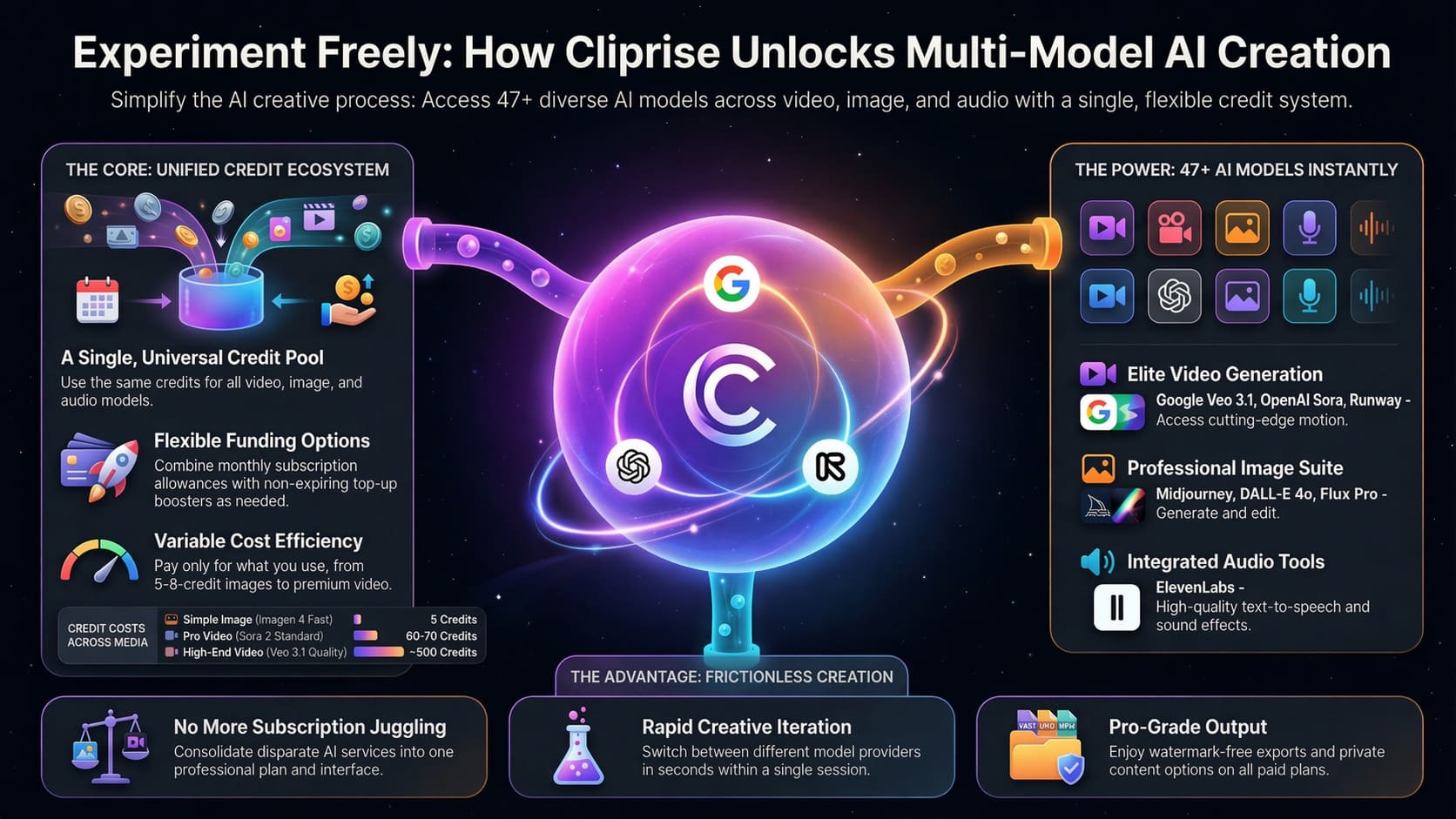
The Creative Explorer's Mindset

🎲 Try Different Models

Each AI model has unique strengths. Flux excels at realism, Midjourney at artistic styles, DALL·E at concepts. Experiment!

🔄 Iterate Quickly

Don't aim for perfection on the first try. Generate variations, tweak prompts, and refine. Your best work comes from iteration.

✨ Happy Accidents

Some of the best creative results come from unexpected AI outputs. Stay open to surprises and explore "mistakes."

📚 Learn as You Go

Every generation teaches you something. Save successful prompts, note what works, and build your creative toolkit.

💡 Pro Tips for Experimentation

  • Start broad, then narrow: Begin with simple prompts, then add details based on results
  • Use seed variations: Keep the same seed and only change one parameter to see its effect
  • Compare side-by-side: Generate multiple versions simultaneously to compare approaches
  • Mix and match: Combine styles, eras, and concepts in unexpected ways
Guides

AI Video Continuity: Keep Scenes Consistent

Build coherent AI video sequences with a continuity sheet, controlled reference frames, shot-level prompts, and a practical review scorecard for characters, settings, lighting, and motion.

12 min
Read Guide
Guides

AI Video Export Settings: A Publishing Checklist

Choose practical AI video export settings for social, web, ads, and client delivery, then verify aspect ratio, resolution, frame rate, audio, captions, artifacts, and final-file playback.

12 min
Read Guide
Guides

Common AI Image Artifacts and How to Fix Them

Diagnose common AI image artifacts in faces, hands, text, products, patterns, and backgrounds, then choose the safest fix: prompt revision, reference, editing, cropping, or regeneration.

13 min
Read Guide
Guides

4o-Image Guide: Generate, Edit, and Refine

Use 4o-Image on Cliprise with a practical brief, controlled reference images, single-variable revisions, and QA checks for products, social visuals, text, and brand details.

11 min
Read Guide
Guides

Wan Speech-to-Video Turbo: Practical Workflow

Prepare a source visual and clean speech, test a short Wan Speech-to-Video Turbo segment, review lip sync and identity, then assemble a safer speaking-video workflow in Cliprise.

11 min
Read Guide
Workflows

AI Product Launch Video Workflow: Plan Teasers, Demos, and Ads

Build an AI product launch video workflow for launch teasers, demo clips, hero loops, social posts, founder updates, retargeting ads, and campaign assets without losing product truth.

19 min
Read Guide
Workflows

AI Retargeting Video Ads Workflow: Create Better Reminder Creative

Build AI retargeting video ads for warm audiences by matching objections, product reminders, demo clips, proof-safe visuals, offer frames, and creative variations without overclaiming results.

18 min
Read Guide
Workflows

AI Video Hook Generator Workflow: Build Better Openings

Create stronger AI video hooks by planning the first frame, viewer problem, motion, caption space, model route, and review criteria before generating social ads, launch clips, and short-form content.

18 min
Read Guide
Workflows

AI SaaS Product Demo Video Workflow: From Screenshots to Launch Clips

Create SaaS product demo videos with AI by turning screenshots, scripts, UI mockups, storyboards, voiceover, and short AI video clips into clear launch, sales, and onboarding assets.

19 min
Read Guide
Workflows

AI UGC Video Generator Workflow: Create Safer Ad Concepts

Build a practical AI UGC video generator workflow for UGC-style ads, creator concepts, product hooks, testimonial-style scenes, and social video tests without inventing false proof or unsafe claims.

18 min
Read Guide
Workflows

AI Website Hero Video Generator Workflow: Build Better Loops

Create website hero videos with AI by planning the first frame, loop motion, aspect ratio, product clarity, page-speed constraints, and CTA-safe final composition before generation.

17 min
Read Guide
Workflows

AI Ad Creative Testing Workflow: Generate, Score, and Iterate

Build a practical AI ad creative testing workflow for video ads, product clips, hooks, image-to-video variations, and social campaigns. Generate controlled variants, score them, and improve the next batch without overclaiming results.

15 min
Read Guide
Workflows

AI B-Roll Generator Workflow for YouTube, Ads, and Social Clips

Use AI to create useful B-roll for YouTube videos, ads, tutorials, product stories, and social clips. Plan shot roles, prompts, aspect ratios, model choices, and review criteria before publishing.

13 min
Read Guide
Workflows

AI Video Storyboard Workflow: Plan Shots Before Generating

Build an AI video storyboard before generating clips. Plan shot order, first frames, prompts, model choices, review criteria, and handoff notes so every AI video output has a clear job.

14 min
Read Guide
Guides

Google Omni Guide: Gemini Omni Flash Video Generation on Cliprise

Gemini Omni Flash is Google's multimodal video model for creating and editing video from text, image, audio, and video references. Learn when to use Google Omni on Cliprise, how it differs from Veo 3.1, and how to build a reference-first AI video workflow.

12 min
Read Guide
Guides

AI Video Generator Cost and Pricing: How Credits Compare

AI video generator cost depends on the plan, credit system, selected model, clip length, input type, and how many retries your team needs. This guide explains how credits compare across video workflows, including image-to-video usage, so creators and teams can estimate monthly AI video spend more clearly.

13 min
Read Guide
Guides

AI Image Prompts Not Working: How to Fix Weak Results

If your AI image prompts are not working, the issue is usually unclear direction, conflicting details, weak references, or the wrong model choice. This guide shows a practical troubleshooting workflow for cleaner, more usable image generations.

8 min
Read Guide
Guides

Image to Video AI: Turn Images and Photos into Videos

Learn how image to video AI turns static photos, product shots, illustrations, and social graphics into short motion clips. This guide covers common problems, prompt structure, production workflows, and when to use Cliprise for testing image-to-video models.

7 min
Read Guide
Guides

How to Write an AI Creative Brief That Produces Usable Assets

Learn how to write an AI creative brief that turns campaign goals into usable images, videos, audio, and social assets. This guide gives marketers and agencies a practical brief structure, prompt workflow, review checklist, and handoff process.

7 min
Read Guide
Comparisons

Runway Image to Video: Alternatives and Workflow

A practical comparison guide for creators evaluating Runway image-to-video workflows, alternatives, and multi-model production methods. Learn when to use Runway-style image animation, how to test other AI video routes, and how to plan a repeatable workflow in Cliprise without relying on one model.

15 min
Read Guide
Comparisons

Seedance AI Video Generator: Prompting and Alternatives

A practical guide to the Seedance AI video generator for creators and teams comparing video models, image-to-video workflows, and safer alternatives. Learn how to prompt for motion, plan tests, avoid common quality problems, and use Cliprise as a multi-model workflow hub while checking current model availability and pricing.

15 min
Read Guide
Comparisons

Veo 3 Image to Video: Alternatives, Cost and Prompt Tips

A practical comparison guide for image to video Veo 3 workflows, including when to use Veo-style motion, when to test alternatives, how to think about credits and cost, and how to write prompts that keep products, people, and brand assets consistent.

15 min
Read Guide
Guides

Image to Video Prompt Guide: Make Still Images Move Naturally

Learn how to write an effective image to video prompt that turns a still frame into natural motion without losing the subject, product, or scene identity. This guide covers prompt structure, camera direction, motion language, model-aware iteration, and practical examples for creators, marketers, ecommerce teams, agencies, and social teams.

12 min
Read Guide
Guides

Realistic and Cinematic AI Video Generator Guide

Learn how to use an ai video generator realistic workflow for cinematic clips, product shots, social ads, animated scenes, and stylized brand content. This guide explains how to choose prompts, source images, motion direction, model workflows, and credit-aware iteration inside Cliprise.

12 min
Read Guide
Comparisons

Luma Dream Machine AI Video Generator: Alternatives and Comparison

A practical comparison of the luma dream machine ai video generator, common image-to-video alternatives, and how creators can choose the right model for ads, social clips, product visuals, and production workflows. Learn when to use Luma directly, when to test alternatives, and when a multi-model platform like Cliprise can reduce workflow friction.

15 min
Read Guide
Comparisons

Pixverse AI Video Generator: Alternatives and Workflow

Compare the Pixverse AI video generator with similar image-to-video workflows, learn what to test before choosing a tool, and build a practical production process for social ads, product clips, and agency content.

7 min
Read Guide
Comparisons

Qwen AI Video Generator and Image to Video Guide

A practical guide to Qwen AI video generator searches, image-to-video workflows, prompt structure, limitations, and safer alternatives for creators comparing AI video tools. Learn when to start with text, when to start with an image, and how to evaluate model outputs without assuming Qwen is available inside every creative platform.

15 min
Read Guide
Comparisons

Sora 2 AI Video Generator: Alternatives and Prompting Guide

Compare the Sora 2 AI video generator with alternative AI video workflows, prompt structures, and practical selection criteria for ads, social clips, product demos, and agency work.

8 min
Read Guide
Comparisons

Wan Image to Video: Wan 2.1, 2.2 and 2.7 Guide

A practical comparison of Wan image-to-video workflows across Wan 2.1, 2.2 and 2.7, focused on production decisions rather than model hype. Learn how to choose a version, plan credits, prepare source images, write prompts, and test alternatives in a multi-model workflow.

15 min
Read Guide
Guides

AI Video Generator API: What to Look for Before Integrating

Before integrating an AI video generator API, evaluate model coverage, image-to-video support, credit economics, workflow fit, reliability, and operational controls. This guide gives developers, founders, agencies, ecommerce teams, and marketing teams a practical checklist for choosing an API without overbuilding around the wrong provider.

14 min
Read Guide
Guides

AI Video Generator with Audio, Voice and Sound

Learn how an ai video generator with audio can combine generated visuals with voice-over, music, dialogue, and sound effects. This guide explains practical workflows, model-selection tradeoffs, credit considerations, and why audio support depends on the model you choose.

12 min
Read Guide
Guides

How to Build an AI Video Workflow for Social Content That Actually Ships

Learn how to build an AI video workflow for social content that turns rough ideas into publishable clips with less back-and-forth. This guide covers planning, model selection, iteration, editing, and a simple handoff process for creators, marketers, and small teams.

7 min
Read Guide
Guides

AI Video Generator App: Create AI Videos on Mobile

Learn how to choose an ai video generator app for mobile workflows, from text-to-video and image-to-video prompts to review, export, and publishing habits. This guide explains what to look for and how Cliprise can fit into a practical mobile creative process.

7 min
Read Guide
Workflows

AI Video Generator for Marketing, Ads and Business

A practical workflow for marketers, founders, agencies, ecommerce teams, and social media teams using an AI video generator for marketing campaigns. Learn how to turn product images, ad briefs, and campaign ideas into short AI videos with Cliprise’s multi-model creative workflow and unified credits.

14 min
Read Guide
Workflows

AI Video Generator for TikTok and Instagram Reels

Learn a practical AI video workflow for TikTok and Instagram Reels, including when to start from an image, when to use text-to-video, and how to write prompts that produce usable vertical clips. This guide is built for creators, marketers, agencies, and ecommerce teams making short-form social content with tools like Cliprise.

14 min
Read Guide
Workflows

AI Video Generator for YouTube and YouTube Shorts

Build a practical AI video generator for YouTube workflow for long-form videos and YouTube Shorts, including prompts, aspect ratios, thumbnails, intro structure, image-to-video examples, and repurposing steps.

15 min
Read Guide
Comparisons

Best Text-to-Video AI Generators (2026): Choose by Workflow

The best text-to-video AI generator depends on the brief. Compare models like HappyHorse, Seedance, Kling, Wan, Veo, Sora, Runway, and Hailuo by workflow, not hype, using Cliprise's multi-model video workspace.

14 min
Read Guide
Guides

AI Image Upscaling Guide: 2K, 4K, 8K and When to Skip

Upscaling is a finishing step, not a repair tool. This guide explains when AI image upscaling actually helps, how to choose between 2K, 4K, and 8K targets, and how to run the full generate-edit-upscale workflow in Cliprise using Topaz Image Upscale and the Universal Upscaler.

13 min
Read Guide
Workflows

Product Photo to AI Video: E-commerce Workflow for Cliprise

Turn product photos into short AI video tests for ecommerce, ads, landing pages, and social media. Learn how to prepare a product still, choose image-to-video models, write motion prompts, compare outputs, and avoid wasting credits.

12 min
Read Guide
Comparisons

Grok Imagine vs Midjourney vs Flux vs DALL-E

Compare Grok Imagine, Flux 2, Imagen 4, Ideogram v3, GPT Image 1.5 and Midjourney as a benchmark. See which image generator fits photoreal products, readable text, art direction and editing workflows.

12 min
Read Guide

Ready to Try These Techniques?

Explore our 47+ AI models and start creating professional images, videos, and audio